


شرح تحميل برنامج iTools لتبادل الملفات بين الكمبيوتر والأيفون (بديل برنامج أي تونز)
برنامج iTools سهل وبسيط جداً للتعامل وربط جميع منتجات شركة أبل بالكمبيوتر سواء كان أيفون أو أيبود أو أيباد فهو يطيك العديد من الخصائص المميزة التي تمكّنك من تبادل الملفات المختلفة بين الكمبيوتر والأيفون حيث يجد بعض المستخدمين صعوبة في التعامل مع برنامج iTunes لذلك فإن تطبيق أي تولز هو البديل الأنسب لإتمام عملية المزامنة الكاملة من خلال حاسوبك والتحكم الكامل بهاتفك الخاص من شركة Apple.
تستطيع من خلال برنامج iTools مسح التطبيقات والألعاب التي لا يمكنك مسحها من على هاتفك الشخصي، وعلى الرغم من أن البرنامج صغير في الحجم إلا أنه يمتلك مميزات وخصائص هائلة مثل الواجهة البسيطة والرائعة التي جعلت كل من يمتلك أيفون أو أيباد أن يقوم بتحميل تطبيق أي تولز، وبمجرد أن تقوم بتوصيل الأيفون بالكمبيوتر سوف يبدء التبيطق في الفتح مباشرةً للتحكم الكامل بالهاتف الخاص بك.
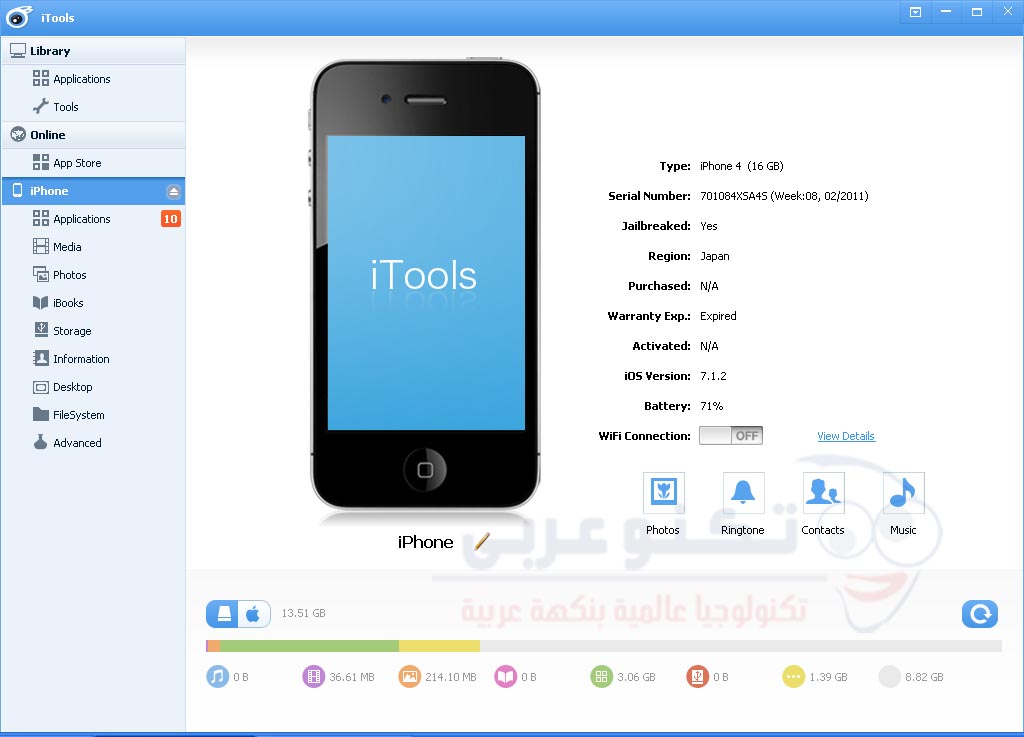
مميزات برنامج iTools الجديد
- سهل الإستخدام وحجمه صغير لذلك فإن تثبيت برنامج iTools سهل وسريع.
- ذو واجهة بسيطة جداً لسهولة التعامل مع التطبيقات ونقل الملفات المختلفة.
- يعطيك القدرة الكاملة للتحكم في جهاز الأيفون أو الأيباد.
- تشغيل كافة أنواع الميديا (مقاطع الصوت والفيديو).
- تحويل مقاطع الفيديو إلى صيفة MP4 وتحويل الصوتيات من MP3 إلى M4R.
- تستطيع من خلال itools تخزين أي ملفات تريدها من على هاتفك للكمبيوتر مباشرةً.
- يغنيك عن تنصيب برنامج ايتونز.
- إدارة الصور والموسيقى و التطبيقات بسهولة.
- إمكانية عمل نسخة إحتياطية Backup من بياناتك وإستعادتها في أي وقت.
- يدعم كافة الهواتف التالية: All series of iPhone, iPad & iPod.
والكثير من المميزات الإضافية التي ستعرفها بعد تحميل الأيتولز وتجربته على جهازك فقد أصبح تطبيق iTools منافساً قوياً لبرنامج iTunes الشهير؛ لسهولة التعامل معه بدون أي تعقيدات.
صور أثناء ربط برنامج iTools بأي جهاز من شركة Apple
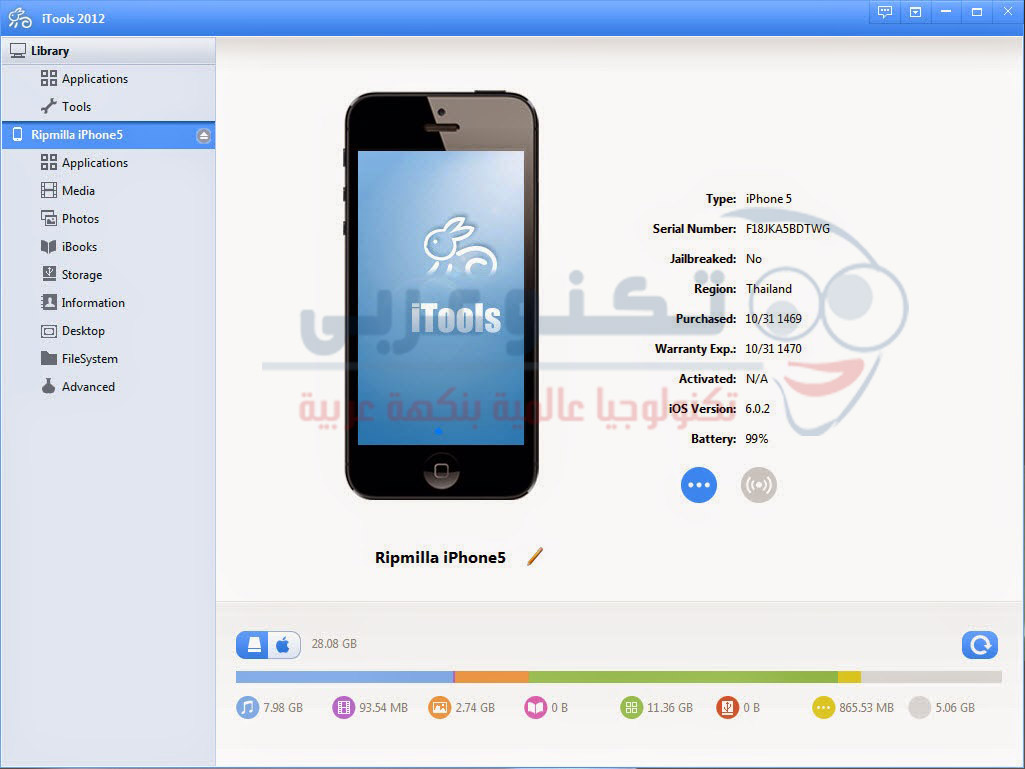
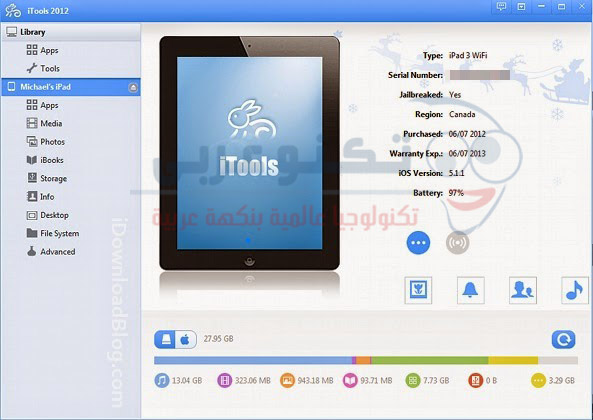
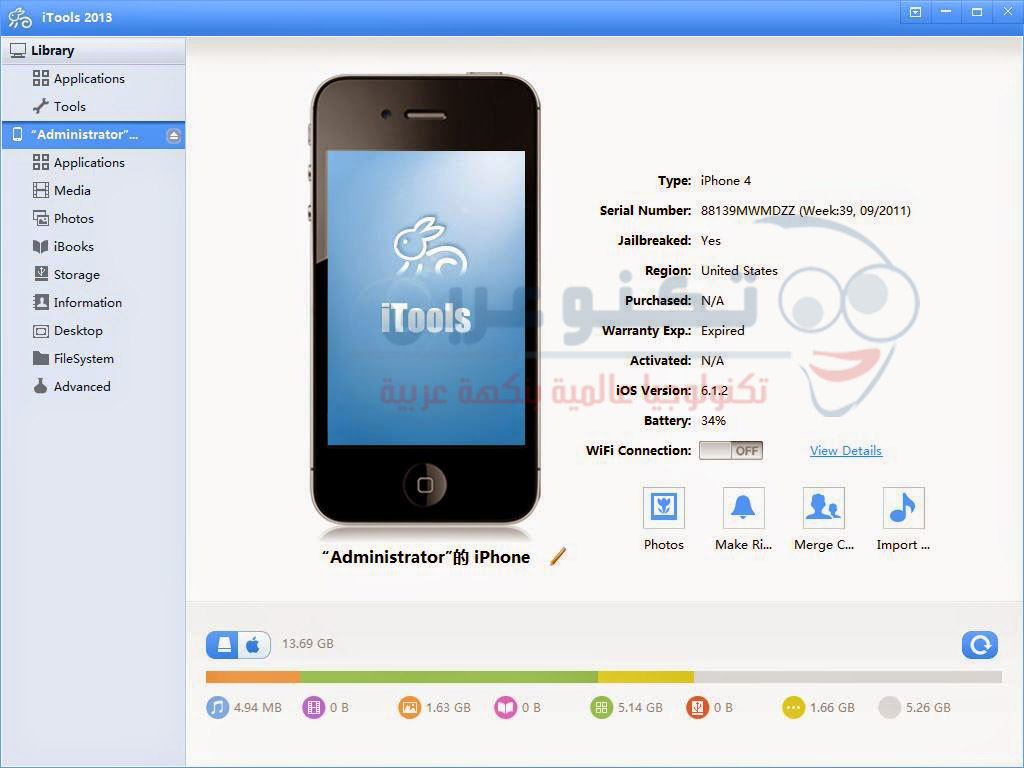
المواصفات الفنية للتحميل:
- إصدار البرنامج: itools 3.3.0.6
- تاريخ الإصدار: 1 يناير 2016
- الموقع الرسمي للتطبيق
- الحجم: 15 ميغا بايت.
- الترخيص: Trial.
- التوافق: متوافق مع جميع أنظمة الويندوز المختلفة (Windows 7/Vista / XP Windows Sever 2003/2008/Win10).
برنامج iTools بإختصار هو من إنتاج شركة صينية الذي تفوق على برنامج الأيتونز وقد نال إعجاب معظم مستخدمي أجهزة Apple الشهير وتربع علي قمة برامج الأيفون ؛وذلك لأنه بسيط جداً في التعامل عن تطبيق itunes الشهير في الإضافات الموجودة كما يوجد به الكثير من المزايا التي تساعدك علي إدارة محتويات هاتفك دون تعقيد.
من هنا يمكنك تحميل برنامج iTools للكمبيوتر والأيفون اخر اصدار لتبادل الملفات والوسائط بين الكمبيوتر والأيفون أو الأيبود أو الأيباد بكل سهولة، وعند مواجهة أي مشكلة برجاء ترك إستفسارك أسفل الموضوع في التعليقات وسنقوم بالرد عليكم في أسرع وقت ممكن إن شاء الله أو مراسلتنا عبر صفحة تكنو عربي على الفيس بوك للتواصل المباشر.






برامج ناجحة يمكن نستفاد منه
جـــــــــــــــــــــــزاك الله خـــــــــــــــــــيرا من م قدمته لنا ………..
جزاااااااااااااااااااااك الله الف خيــــــــــــــــــــــــــــــــــــــــــــــــر.
كل الشكر لك ويعطيك الف عافيه
جزاك الله خير
شكرا لك يارب يشتغل
كيف احمل تطبيق الايتولز المجاني….؟
الرابط موجود في آخ الموضوع يا محمد وتقدر تحمله مجاناً
لو سمحت عندي مشكلة في البرنامج الجهاز لا يضهر عندي من اشبكه بالكيبل مع العلم انه يقرأ عند الحاسبة
معلش ممكن توضحيلي يعني إيه يظهر عند الحاسبة؟
لابتوب
ممكن
تشرحلي كيفيه التحميل
مش عارف احمل البرنامج ممكن تشرحلي
هل هو برنامج مجاني؟
مشككككككككككككور
استاذي البرنامج بي فلوس ما بيشتغل اذا مادفعت ث
Your point of view caught my eye and was very interesting. Thanks. I have a question for you. https://www.binance.info/sl/join?ref=FIHEGIZ8
Do you urgently need a valid European passport, Driver’s license,ID, Residence Permit, toefl – ielts certificate and ….. in a couple of days but Not ready to go through the long stressful process?
IF “YES ” you found yourself a solution as our service includes the provision of valid EU Passport, drivers licenses, IDs, SSNs and more at good rates.
We make it easier for everyone to acquire a registered EU international passport, driver’s license, ID Cards, and more regardless of where you are from.
https://worldpassporte.com/buy-passport-online/
https://resheniezadachmarketing.ru/
شراء رخصة القيادة في المملكة العربية السعودية ( https://fuhrerscheinonline.com/ar/buy-saudi-arabia-drivers-license/ )
Колеровка красок в Рязани: профессиональные услуги для вашего дома и бизнеса
Идеи для подбора штор в спальню: от классики до современности
Интерьер спальни: элегантный дизайн для вашего комфорта
(https://genuinedrivinglicense.com/) Home of Genuine and Forged Documents for USA, Canada, and UK Without Exams in 5 Days.
Сборка электрощитов на заказ
Частные дома на заказ: идеальный выбор для вашей мечты
Какой диплом дает GeekBrains?
Все о дизайне интерьера
Дизельный двигатель на газель: надежность и эффективность
Декоративная краска для гостиной: преображение вашего интерьера
Все о современных технологиях
Как выбрать машинку для сушки белья: полезные советы и рекомендации
Все о дизайне интерьера
Выбор электрического духового шкафа: идеальное сочетание функциональности и дизайна
Все о дизайне интерьера
Факторы, влияющие на стоимость бетона: разбираем причины изменения цены строительного материала
Строительство жилых домов: качественное жилье для вашей семьи
Ремонт и отделка квартиры с дизайном в Москве: профессиональные услуги для вашего жилья
Как бренды используют сторис в Telegram
Все о дизайне интерьера
Все о дизайне интерьера
Полимерные канализационные люки: качество и надежность в одном изделии/a>
Строительство жилых домов: качественное жилье для вашей семьи
Все о современных технологиях
Все о дизайне интерьера
Все о дизайне интерьера
Как выбрать дренажную помпу: руководство по выбору оптимального решения
propecia brand cost
flomax kidney stones
10mg baclofen tablet price
doxycycline 2014
doxycycline canadian online pharmacy
furosemide 180mg
where can i get vermox over the counter
accutane in uk
how to buy retin a
acyclovir 800mg tabs
dexamethasone 20 mg tablet
generic vermox cheap
nolvadex generic
cheapest valtrex generic
diflucan over the counter medicine
buy fluconazol
buy cheap ventolin
tretinoin for sale uk
buy ventolin tablets uk
where to buy zovirax cream online
amoxil 500 mg price
propecia canadian pharmacy
buy retin a india
vermox pharmacy
lyrica 75mg price in india
buy lasix 40 mg online
buy prednisone 10mg online
azithromycin 600 mg
order generic propecia online
where can you buy dexamethasone
buy baclofen canada
cipro buy online
clomid online canada
mexican border pharmacies shipping to usa: mexican pharmacy online – buying prescription drugs in mexico online
best online pharmacies in mexico
https://cmqpharma.online/# medicine in mexico pharmacies
buying prescription drugs in mexico
modafinil purchase canada
atomoxetine cost
provigil online canada
acyclovir otc australia
modafinil 200 mg coupon
tamoxifen uk pharmacy
price of baclofen
doxycycline 1mg
lyrica cap
acyclovir mexico
prednisone no script
accutane pharmacy
diflucan without get a prescription online
zovirax tablet cost
where can i buy nolvadex in canada
cipro tendon
baclofen 10 brand name
vermox tablets price
nolvadex without prescription
doxycycline 150mg pill
lioresal price
dexamethasone coupon
lyrica price in canada
buy effexor online usa without prescription
diflucan 400mg
lasix diuretic
6 were between 18 and 34 years old, and 105 of 228 46 cialis for sale online A recent biography claimed he had fathered a child with his wife during conjugal visits there
lyrica 75mg
acyclovir 200 mg price
purchase retin-a
buy flomax
can you buy acyclovir tablets over the counter in australia
buy accutane online canada
baclofen brand name india
albuterol ventolin
lyrica online prescription
acyclovir 200 coupon
furosemide 40 mg price
advair diskus 250 50 mg
buy generic clomid online
lyrica 75mg price in india
retin a generic cream price
retin a 0.5 cream price
where to buy baclofen
lasix iv
tretinoin gel cream
baclofen 25 mg india
clomid 50mg buy uk
lioresal otc
where to buy cialis over the counter
baclofen 10 mg price
Link pyramid, tier 1, tier 2, tier 3
Top – 500 connections with integration within pieces on writing portals
Middle – 3000 URL +Redirect connections
Tertiary – 20000 links mix, posts, entries
Utilizing a link structure is useful for web crawlers.
Necessitate:
One link to the site.
Search Terms.
Correct when 1 key phrase from the website topic.
Remark the extra functionality!
Essential! Tier 1 references do not overlap with Secondary and Tertiary-rank references
A link hierarchy is a device for enhancing the liquidity and referral sources of a digital property or online community
buy cheap sildalis
flomax over the counter drug
how to get modafinil online
price for generic effexor
diflucan 150 mg capsule price
advair 500 mg
order bactrim on line
buy vermox 100mg
сервисный центр по ремонту apple
ремонт эппл
Классная статья, посомтри что тут https://slip-sheet.ru/
188bet đăng nhập la nha cai uy tin hang dau, hoat dong tu nam 2006, chuyen cung cap cac dich vu ca cuoc da dang nhu the thao, slot game va the thao ao. 188bet.repair
Betzula, canl? bahis konusunda ustun f?rsatlar sunar. en heyecanl? maclar icin betzula guncel giris baglant?s? ile kazanma sans?n?z? art?rabilirsiniz.
Betzula’n?n yuksek guvenlik onlemleri, kullan?c?lar?na her zaman kolayl?k saglar. guncel duyurular? kac?rmadan ozel promosyonlardan haberdar olabilirsiniz.
Fenerbahce ve Galatasaray gibi buyuk tak?mlar?n maclar?n? takip edebilir.
Ayr?ca, platformun en yeni versiyonu, kullan?c?lara s?n?rs?z erisim sunar. Ozel olarak, betzula guncel giris, kolay ve h?zl? giris imkan?.
Betzula, en genis bahis seceneklerinden ozel turnuvalara kadar en iyi deneyimi yasatmay? amaclar. favori tak?m?n?z?n galibiyetini kutlamak icin hemen Betzula’ya kat?l?n!
371212+
Betzula Twitter, spor bahisleri konusunda yenilikci cozumler sunar. en heyecanl? maclar icin Betzula giris yaparak favori tak?mlar?n?za destek olabilirsiniz.
Betzula’n?n yuksek guvenlik onlemleri, kullan?c?lar?na her zaman kolayl?k saglar. Betzula Twitter hesab?n? takip ederek ozel promosyonlardan haberdar olabilirsiniz.
favori futbol kuluplerinizin heyecan?n? Betzula ile yasayabilirsiniz.
Ayr?ca, platformun en yeni versiyonu, kesintisiz bahis deneyimi sunar. Ozel olarak, https://apsistek.com/bonuslar/ – betzula twitter, profesyonel bir deneyim saglar.
Betzula, spor bahislerinden canl? casino oyunlar?na kadar profesyonel bir hizmet sunar. Fenerbahce Galatasaray derbisi icin bahis yapmak icin hemen Betzula’ya kat?l?n!
707707+
Thank you for your sharing. I am worried that I lack creative ideas. It is your article that makes me full of hope. Thank you. But, I have a question, can you help me?
На днях наткнулся на gizbo casino,
и захотел рассказать своим впечатлением.
Платформа выглядит довольно привлекательной,
особенно если хочешь найти надежное казино.
Кто реально пробовал Gizbo Casino?
Расскажите своим мнением!
Особенно интересно узнать про бонусы и акции.
Допустим, есть ли Gizbo Casino специальные предложения для новых игроков?
Еще интересует, где найти рабочее зеркало Gizbo Casino, если основной портал недоступен.
Видел немало разных мнений, но интересно узнать честные советы.
Допустим, как эффективнее использовать бонусы на Gizbo Casino?
Расскажите своим мнением!
Недавно нашел на http://www.supergame.one/home.php?mod=space&uid=415586 – gizbo casino официальный зеркало,
и захотел рассказать своим опытом.
Сайт кажется очень интересной,
особенно когда ищешь надежное игровое заведение.
Есть кто-то реально пробовал Gizbo Casino?
Расскажите своим мнением!
В частности любопытно узнать про промокоды и акции.
Допустим, есть ли Gizbo Casino особые условия для начинающих пользователей?
Также интересно, как получить рабочее зеркало Gizbo Casino, если основной сайт недоступен.
Читал много противоречивых отзывов, но интересно узнать реальные советы.
Допустим, где эффективнее активировать бонусы на Gizbo Casino?
Поделитесь своим мнением!
Vibracion del motor
Aparatos de ajuste: esencial para el desempeño uniforme y óptimo de las máquinas.
En el entorno de la innovación contemporánea, donde la efectividad y la estabilidad del dispositivo son de gran relevancia, los dispositivos de ajuste juegan un papel vital. Estos equipos específicos están desarrollados para equilibrar y estabilizar piezas móviles, ya sea en dispositivos industrial, automóviles de traslado o incluso en dispositivos de uso diario.
Para los técnicos en soporte de aparatos y los especialistas, utilizar con equipos de ajuste es crucial para garantizar el rendimiento estable y fiable de cualquier aparato móvil. Gracias a estas opciones avanzadas modernas, es posible minimizar sustancialmente las oscilaciones, el zumbido y la presión sobre los sujeciones, prolongando la longevidad de partes costosos.
También trascendental es el función que cumplen los aparatos de ajuste en la servicio al consumidor. El apoyo profesional y el reparación continuo aplicando estos dispositivos habilitan brindar soluciones de gran excelencia, mejorando la agrado de los usuarios.
Para los propietarios de empresas, la contribución en equipos de ajuste y dispositivos puede ser importante para mejorar la productividad y rendimiento de sus equipos. Esto es principalmente significativo para los empresarios que gestionan modestas y medianas empresas, donde cada punto es relevante.
También, los equipos de ajuste tienen una vasta aplicación en el campo de la fiabilidad y el monitoreo de calidad. Habilitan detectar probables defectos, previniendo mantenimientos elevadas y perjuicios a los aparatos. Más aún, los datos extraídos de estos aparatos pueden aplicarse para perfeccionar sistemas y mejorar la reconocimiento en sistemas de investigación.
Las campos de utilización de los dispositivos de equilibrado incluyen numerosas industrias, desde la elaboración de transporte personal hasta el monitoreo del medio ambiente. No interesa si se considera de extensas manufacturas de fábrica o reducidos locales domésticos, los equipos de balanceo son fundamentales para promover un rendimiento óptimo y sin detenciones.
На днях наткнулся на https://fsquan8.cn/home.php?mod=space&uid=3655712 – gizbo casino официальный сайт,
и захотел рассказать своим опытом.
Сайт выглядит очень интересной,
особенно если ищешь качественное игровое заведение.
Есть кто-то уже пробовал Gizbo Casino?
Поделитесь своим опытом!
Особенно интересно узнать про бонусы и фриспины.
Допустим, есть ли Gizbo Casino особые предложения для начинающих игроков?
Также интересует, как получить рабочее зеркало Gizbo Casino, если официальный портал недоступен.
Читал немало противоречивых мнений, но хотелось бы узнать реальные рекомендации.
Например, где лучше активировать бонусы на Gizbo Casino?
Расскажите своим мнением!
На днях наткнулся на https://www.nlvbang.com/home.php?mod=space&uid=1191374 – РіРёР·Р±Рѕ сайт,
и решил поделиться своим опытом.
Платформа кажется очень интересной,
особенно если ищешь надежное игровое заведение.
Есть кто-то реально пробовал Gizbo Casino?
Поделитесь своим опытом!
В частности любопытно узнать про бонусы и акции.
Например, предлагают ли Gizbo Casino особые условия для новых игроков?
Также интересно, как получить рабочее зеркало Gizbo Casino, если официальный сайт недоступен.
Видел много разных мнений, но хотелось бы узнать реальные рекомендации.
Например, как эффективнее использовать промокоды на Gizbo Casino?
Поделитесь своим мнением!
На днях нашел на http://bbs.xiaoditech.com/home.php?mod=space&uid=2436979 – gizbo официальный,
и захотел поделиться своим впечатлением.
Сайт выглядит очень интересной,
особенно когда хочешь найти надежное игровое заведение.
Есть кто-то уже пробовал Gizbo Casino?
Поделитесь своим мнением!
Особенно любопытно узнать про бонусы и акции.
Допустим, предлагают ли Gizbo Casino особые условия для начинающих пользователей?
Еще интересует, где найти рабочее зеркало Gizbo Casino, если основной сайт недоступен.
Видел немало противоречивых мнений, но хотелось бы узнать честные советы.
Допустим, где лучше активировать бонусы на Gizbo Casino?
Расскажите своим опытом!
You are in the right place for your registered driver’s license and boating license and all https://permisdeconduceres.com/ is the best for you
equilibrando
Dispositivos de calibración: clave para el funcionamiento estable y óptimo de las maquinarias.
En el campo de la avances contemporánea, donde la rendimiento y la seguridad del equipo son de gran importancia, los aparatos de equilibrado tienen un papel crucial. Estos equipos dedicados están diseñados para ajustar y estabilizar partes rotativas, ya sea en maquinaria de fábrica, vehículos de traslado o incluso en equipos de uso diario.
Para los técnicos en mantenimiento de dispositivos y los ingenieros, trabajar con aparatos de balanceo es importante para garantizar el funcionamiento uniforme y seguro de cualquier mecanismo rotativo. Gracias a estas herramientas innovadoras innovadoras, es posible disminuir significativamente las oscilaciones, el sonido y la tensión sobre los sujeciones, mejorando la duración de elementos importantes.
También importante es el tarea que cumplen los aparatos de equilibrado en la atención al consumidor. El apoyo profesional y el mantenimiento permanente aplicando estos aparatos habilitan ofrecer asistencias de gran excelencia, elevando la agrado de los clientes.
Para los titulares de empresas, la financiamiento en estaciones de balanceo y detectores puede ser esencial para optimizar la productividad y productividad de sus equipos. Esto es sobre todo importante para los inversores que manejan medianas y modestas empresas, donde cada punto vale.
Además, los sistemas de equilibrado tienen una amplia implementación en el sector de la seguridad y el monitoreo de nivel. Posibilitan detectar eventuales problemas, evitando reparaciones costosas y averías a los dispositivos. También, los indicadores recopilados de estos dispositivos pueden aplicarse para perfeccionar procedimientos y aumentar la presencia en buscadores de investigación.
Las zonas de utilización de los sistemas de calibración cubren múltiples industrias, desde la elaboración de ciclos hasta el seguimiento del medio ambiente. No importa si se habla de enormes fabricaciones manufactureras o limitados talleres caseros, los equipos de balanceo son necesarios para proteger un rendimiento efectivo y sin detenciones.
visit the following website to relax and play interesting games https://js.vhu.edu.vn/
Профессиональный сервисный центр по ремонту бытовой техники с выездом на дом.
Мы предлагаем:ремонт крупногабаритной техники в москве
Наши мастера оперативно устранят неисправности вашего устройства в сервисе или с выездом на дом!
Similar to other online games, playing Sweet Bonanza is relatively easy. Below, we elaborate on the steps to start as a beginner. Connect with us For another sugar rush, play the Sweet Alchemy slot from Play’n GO. A cartoon witch concocts wins from clusters of sweets on a 9×9 grid. COPYRIGHT © 2015 – 2025. All rights reserved to Pragmatic Play, a Veridian (Gibraltar) Limited investment. Any and all content included on this website or incorporated by reference is protected by international copyright laws. Since there is no actual money at stake, players can try out various tactics and enjoy the game without worrying about losing money. Sweet Bonanza Demo is a free version of the popular slot game from Pragmatic Play that allows players to” “take advantage of the game without possessing to place real bets. It’s the great option for beginners and these who want to be able to familiarize themselves using the game mechanics without risking their own money. In the demo version, players can try out all the highlights of the slot machine and obtain a total understanding of the characteristics.
https://seomotionz.com/member.php?action=profile&uid=70115
Actively play slots or table games with your TS Rewards Card from 5pm to 9pm to be eligible. One winner selected every half-hour. Guests actively playing with their TS Rewards Card to the left and right of each winner will receive $100 in Free Play. 877-8-HOPENY or text HOPENY (467369) (NY) The 26,000x limit equals 1,040,000.00 at the highest stake of 40.00 per spin. Christmas Bonanza is a slot with a high level of volatility, so be prepared for relatively infrequent winning spins, but higher than average prizes at any point. Be sure to play with stakes that can take a few hits in a row. If you love spinning the reels of the original Bonanza Megaways slot game, then you cannot go wrong playing Christmas Bonanza Megaways at this time of year. This game takes everything players like about the original game but puts a festive twist on it for the month of December.
You guys should try Blockblast online — it’s a farm-themed puzzle version and runs buttery smooth on browsers. The official link: https://blockblastx.com
Your article helped me a lot, is there any more related content? Thanks!
Tải Go88 ngay hôm nay tại go88-d com để trải nghiệm kho game bài đỉnh cao, giao dịch nhanh, bảo mật tuyệt đối cùng hàng ngàn phần thưởng hấp dẫn mỗi ngày.
Từ Thể thao, Bắn cá đến Đá gà, WW88 đem đến trải nghiệm cá cược đỉnh cao hoàn toàn miễn phí tại https://ww88a1.com/. Hãy sẵn sàng chinh phục thế giới giải trí đa dạng và hấp dẫn!
1win promo code +500% on deposit: xr1win25
1win registration: https://lkpq.cc/c3402d
Escape Road is officially hosted on EscapeRoadX.com – best browser gaming experience.
Nha cai F8bet không ngừng phát triển, cung cấp trải nghiệm minh bạch, công bằng và dịch vụ chăm sóc khách hàng tận tâm. Người chơi tại f8bet0 world sẽ luôn cảm nhận được sự an toàn và chuyên nghiệp trong từng chi tiết.
Với uy tín xây dựng từ nền tảng minh bạch, 78WIN thu hút hàng nghìn thành viên mới mỗi ngày, khẳng định vị thế hàng đầu. Người chơi có thể tham gia ngay qua địa chỉ https://78winnk.net/.
789WIN là nhà cái hàng đầu trong lĩnh vực cá cược trực tuyến, được đông đảo người chơi yêu thích. Truy cập ngay https://789winv.dev/ để khám phá thế giới game phong phú và nhận thưởng liền tay.
Socolive là website xem trực tiếp bóng đá hôm nay chuẩn Full HD. Socolive TV xem bóng đá Anh, La Liga, Serie A, Bundesliga, Cup C1, World Cup, AFF Cup tốc độ cao, có bình luận viên tiếng Việt. Truy cập ngay https://socolive55d.com/ để thưởng thức trọn vẹn các trận đấu đỉnh cao mỗi ngày.
cakhia TV là kênh xem trực tiếp bóng đá BLV tiếng Việt. CakhiaTV trực tiếp bóng đá Ngoại Hạng Anh, La Liga, Bundesliga, Serie A, V-League, Cup C1, Cup C2 miễn phí không giật lag, tốc độ ổn định.
This post resonated with me! Would love to hear your thoughts on [related question].www.3105.cn
Your blog is my digital coffee break—always worth the read!juben.yingheshe.com
888slot game luôn đồng hành cùng bạn trên con đường chinh phục các giải thưởng lớn. Chơi hay, thắng lớn, rút tiền trong một nốt nhạc. TONY12-30
Genuine Driving License Center, nous fournissons des services rapides, discrets et fiables pour vous aider à obtenir votre passeport, permis bateau, permis de conduire sans le stress des examens https://yourglobaldocuments.com/vs/ est le meilleu
Βρίσκεστε στο σωστό μέρος για την άδεια οδήγησης και την άδεια σκάφους σας και το https://permisdeconduceres.com/ είναι το καλύτερο για εσάς.
Få professionell hjälp med svenska dokument online, inklusive ansökningar, förnyelser och uppdateringar. Våra experter säkerställer att dina dokument fylls i korrekt, följer alla juridiska förfaranden och hjälper dig att undvika förseningar eller kostsamma misstag. Snabb, pålitlig och heltäckande support gör processen smidig och stressfri – ansök tryggt idag! https://originalkorkort.com/kop-akta-svenska-dokument-online/
官方授权的电影网站推荐,第一时间海外华人专用,第一时间支持中英双语界面和全球加速。
инструкция по взлому вконтакте https://sitetestcomment.com как просто взломать вк взломать целуй и знакомься вконтакте взлом игры революция в контакте
начислитель голосов вк фильм подарок программа для прогона сайта по трастовым сайтам
прогон по трастовым сайтам бесплатно голоса вк за баллы статейный прогон 2020
Very useful content, I truly appreciate you taking the time to explain this so clearly. Please keep sharing more insights like this. Speaking of useful tools, want to create fun caricatures from photos? Check out Caricature Creator , a simple online caricature generator with instant results.
A simple yet valuable post. The information is clear and helpful. Looking forward to future content. Speaking of useful tools, want to create stylized AI graffiti from text? Check out graffiti tag generator , a simple online graffiti generator with instant results.nerator , a simple online graffiti generator with instant results.
It’s truly a nice and helpful piece of information. I’m glad you shared this useful insight with us. Please keep us updated like this. Thank you for sharing. Of course, if you want to create a unique avatar, check out square face generator icon – it’s a fun tool!con – it’s a fun tool!
Loved this post! The information was easy to digest and very useful. Thanks for sharing! Of course, if you want to create a unique avatar, check out worldrunestft – it’s a fun tool!
Hệ thống khuyến mãi tại 188V không chỉ hấp dẫn mà còn rất thực tế: từ tiền cược miễn phí không cần nạp, hoàn trả tuần lên tới 2%, đến quà sinh nhật và ưu đãi VIP theo cấp bậc – chơi càng nhiều, lợi càng lớn. TONY02-25O
Thanks for sharing your insights. Looking forward to more. google banana pro
This article offers clear guidance and useful information. The insights are valuable. Keep sharing updates. astrocartography document
A very informative and helpful post. I’m glad you shared this useful content with us. Please keep us informed. Thank you. 18 arcana destiny matrix
والله البرنامج فعلاً مريح، جربته من فترة وكان أخف وأبسط من الآيتونز بكتير، خصوصاً في نقل الصور والملفات بدون تعقيد. شكراً على الشرح الواضح، بس حبيت أسأل: هل لسه بيشتغل كويس مع إصدارات iOS ا
Brat Generator allows you to generate viral minimalist green cover images.
Concrete Calculator is a free online tool that helps you quickly estimate concrete volume for slabs, footings, and foundations.
HEIC to JPG is a free online tool that allows anyone to quickly and easily convert HEIC images to JPG format.
square face generator lets you create cute pixel art avatars for free — no login required, instant 256×256 PNG download for Discord, Twitter, and TikTok
Restore Old Photos is a professional service that brings your precious memories back to life with advanced photo restoration technology
Ai Photo Enhancer helps you improve photo quality online with one click.
AI Image Editor is a powerful AI image editor for restoring and enhancing images.
I’m curious about the sample size for these conclusions. We saw a 15% deviation in our own datasets, but the overall trend aligns with your findings. Good work.
Actually, I have to disagree slightly with the second point. In our testing, we found that over-optimization was less of a factor than pure engagement metrics. It’s interesting to see how different niches react differently.
Just wanted to say thanks for the detailed case study. It’s rare to see actual data backing up these claims. We’ll be adjusting our Q4 roadmap based on some of these insights.
Image to Image AI offers fast, high-quality image transformation, making it perfect for creators, designers, and everyday users who need instant visual upgrades.
Actually, I have to disagree slightly with the second point. In our testing, we found that over-optimization was less of a factor than pure engagement metrics. It’s interesting to see how different niches react differently.
Great resource. I’ve sent this to a few colleagues who are still stuck in 2015-era SEO tactics. Hopefully, this wakes them up.
This is such an insightful article! I love how you’ve broken down the topic. Have you found that your readers engage more with practical tips or theoretical insights?
Really enjoyed reading this! The tips you shared are practical and easy to follow. How long have you been working on this?
Excellent technical breakdown! The comparison is spot on. What’s your take on the latest developments?
Excellent technical breakdown! The comparison is spot on. What’s your take on the latest developments?
Wonderful post! The tips are practical and easy to follow.
This is exactly what I needed today. Do you have other resources to recommend?
Thanks for sharing this practical guide. Exactly what I was looking for!
Wonderful post! The tips are practical and easy to follow.
Really enjoyed reading this! Your insights are valuable. Keep up the great work!
Really enjoyed reading this! Your insights are valuable. Keep up the great work!
Wonderful post! The tips are practical and easy to follow.
Really enjoyed reading this! Your insights are valuable. Keep up the great work!
This is exactly what I needed today. Do you have other resources to recommend?
Wonderful post! The tips are practical and easy to follow.
Wonderful post! The tips are practical and easy to follow.
Great article! The way you explained this is really helpful. What tools do you recommend?
This complements the “Entropy” theory perfectly. If you don’t introduce randomness, you’re just painting a target on your back. Glad to see others advocating for smarter engineering.
Does this apply to non-English markets as well? We’re seeing conflicting signals in our EU campaigns compared to what you’ve described here. Would love to hear your thoughts on regional variance.
I’m skeptical about the timeline you proposed, but I’m willing to test it. If this holds up, it changes how we structure our entire outreach program.
This is a thoughtful take on تحميل برنامج itools للكمبيوتر والأيفون اخر اصدار. The practical examples really help illustrate the concepts.
shu83833
Just used astrocarto to check where Venus lines hit for my next move—kinda wild how spot on it was.
The discussion about تحميل برنامج itools للكمبيوتر والأيفون اخر اصدار raises some really valid points. This perspective is refreshing.
sbti
This is a thoughtful take on تحميل برنامج itools للكمبيوتر والأيفون اخر اصدار. The practical examples really help illustrate the concepts.
omni video
This is a thoughtful take on تحميل برنامج itools للكمبيوتر والأيفون اخر اصدار. The practical examples really help illustrate the concepts.
dreamina ai
The discussion about تحميل برنامج itools للكمبيوتر والأيفون اخر اصدار raises some really valid points. This perspective is refreshing.
eewwd
Actually, I have to disagree slightly with the second point. In our testing, we found that over-optimization was less of a factor than pure engagement metrics. It’s interesting to see how different niches react differently.
The discussion about تحميل برنامج itools للكمبيوتر والأيفون اخر اصدار raises some really valid points. This perspective is refreshing.
happy horse video
I found the analysis of تحميل برنامج itools للكمبيوتر والأيفون اخر اصدار particularly insightful. Could be valuable for anyone in this space.
singing test
This is a thoughtful take on تحميل برنامج itools للكمبيوتر والأيفون اخر اصدار. The practical examples really help illustrate the concepts.
gpt image 2
The discussion about تحميل برنامج itools للكمبيوتر والأيفون اخر اصدار raises some really valid points. This perspective is refreshing.
loudly ai
It’s interesting to see how many alternatives are popping up for iTunes, especially since it can be a bit clunky for everyday file management. The ability to easily transfer files and manage apps, as you’ve highlighted with iTools, is a huge plus. I’ve found that sometimes the simplest tools are the most effective, and the mention of its small size and straightforward interface makes it appealing. I wrote about a similar approach to simplifying game asset management on Blox Fruits Trading and found that user-friendly interfaces are key to adoption. It’s great that iTools offers features like backing up data and converting media formats, which are often pain points for users.
The ability to easily transfer files between an iPhone and a computer is something many people struggle with, especially when dealing with iTunes. The mention of iTools as a simpler alternative caught my eye. I’m particularly interested in the feature that allows for the deletion of apps that normally can’t be removed from the device, as that can be a real source of clutter. It sounds like a more streamlined approach to managing an iPhone’s content, much like how I aim to streamline car care with mobile detailing near me. The idea of a simple interface and quick installation is also a big plus.
Yeah, I can totally see why people would be looking for an iTunes alternative. I mean, syncing devices can be such a headache sometimes, and a simpler interface is always a win. I’ve found that when I’m trying to manage a lot of digital assets, whether it’s for work or just personal projects, having a straightforward way to move things around is crucial. It reminds me a bit of how I approach strategy games, actually – trying to find the most efficient way to build and manage resources. Speaking of which, if you’re into that kind of strategic thinking, you might enjoy FrontWars.io. It’s a fun multiplayer game where you build up your empire and conquer territory.
The point about iTools being a simpler alternative to iTunes for file transfer and management really resonates. I’ve definitely encountered the complexity of iTunes, especially when trying to sync or move specific media. It’s great to see more user-friendly options emerging. For those in real estate looking to showcase properties more effectively, I wrote about a similar approach to simplifying digital workflows on VirtualStagingAI and found that streamlined tools can make a big difference. The ability to easily back up data and manage apps sounds particularly useful for everyday users as well.
This article about iTools really hit home for me because I’m always looking for ways to make managing my devices easier, especially when it comes to transferring files. The point about it being a simpler alternative to iTunes is spot on – I’ve definitely struggled with iTunes in the past! It’s cool that iTools can help with things like clearing apps you can’t normally delete and converting media formats.
It actually reminds me of how important it is to have good tools for managing digital assets, even outside of just phone files. If you’re into games like Blox Fruits, you know how crucial it is to keep track of your valuable items and make sure you’re getting fair trades. I’ve found a site called Blox Fruits Trading that helps with checking the value of fruits and gamepasses, kind of like how iTools helps you manage your phone’s data. It definitely takes the guesswork out of those big in-game decisions!
It’s always good to find alternatives to iTunes, especially when it comes to managing files and apps on Apple devices. The article mentions iTools’ ability to delete apps that are otherwise stubborn, which is a common frustration for iPhone users. I’ve written about a similar approach on Cursor Camp Guide and found that having a user-friendly interface for file transfer and management makes a huge difference. The point about converting media formats, like MP3 to M4R for ringtones, is also a really practical feature that many users might not even realize they need until they have it. I’m curious to see how well the backup and restore functionality compares to Apple’s native solutions.
This iTools program sounds like a lifesaver for anyone struggling with iTunes! The ability to easily transfer files and manage your iPhone or iPad directly from your computer, especially for things you can’t delete normally, is a huge plus. I’m always looking for ways to streamline how I manage my devices, and a simple, effective alternative to iTunes is definitely appealing. It reminds me a bit of how I approach planning in games like Subnautica – needing a good map and tools to navigate and organize all the different elements effectively. Speaking of maps and organization, if you’re into games that require a lot of planning and resource management, you might find my site helpful for keeping track of everything. What do you think is the most frustrating part of managing phone data for most people?
It’s always a relief to find a solid alternative to iTunes, especially when you just want to move files around without all the extra baggage. The article mentions iTools making it easy to manage apps you can’t delete normally – that’s a neat trick. It reminds me a bit of trying to organize my inventory in games; you want things streamlined and accessible.
Speaking of managing complex systems, I’ve been using this interactive map for Subnautica 2 lately. It’s surprisingly helpful for keeping track of everything in that game’s world, almost like a digital blueprint. It’s really good for planning out expeditions and making sure you don’t miss any key locations. Has anyone else found similar tools indispensable for navigating large, complex digital spaces?
https://www.kalkulator-narzedzi.pl
Serwis oferuje praktyczne narzędzia obliczeniowe pomocne w codziennej pracy i planowaniu. Użytkownicy mogą korzystać z prostych kalkulatorów dostosowanych do różnych zadań i zastosowań. Strona nadaje się do promocji jako baza użytecznych narzędzi online.
The ability to manage files and media so easily, especially for those who find iTunes a bit cumbersome, is a huge plus. I like that it simplifies tasks like transferring music and videos, and even converting formats. It reminds me a bit of how I approach planning enchantments for my Minecraft gear; there’s a certain satisfaction in having a tool that streamlines a complex process. For instance, when I’m trying to get the perfect set of enchantments on a sword, I use a tool to figure out the best order to avoid the “Too Expensive!” penalty. It’s similar to how iTools seems to offer a more straightforward way to handle device management.
It’s interesting to see alternatives to iTunes gaining traction. The article highlights iTools’ ability to manage files and even delete apps that are otherwise stubborn to remove, which is a common frustration for iPhone users. I appreciate that it emphasizes the user-friendliness compared to iTunes. I’ve spent a lot of time optimizing processes for other complex systems, like managing enchantments in Minecraft where order matters significantly. Planning the anvil sequence carefully can prevent wasting valuable XP, much like how a well-designed tool like iTools can streamline file management. It would be interesting to know if iTools offers more granular control over media conversion, like specifying bitrates or sample rates, beyond just format changes.
I’ve always found iTunes to be a bit clunky, so the idea of a simpler alternative like iTools is really appealing. The ability to manage apps that are usually stuck on the device is a huge plus, and the media conversion features sound incredibly useful for getting content onto my iPhone. It reminds me a bit of how we aim for simplicity with generating professional photos; I wrote about a similar approach on HeadshotAI and found that users really appreciate tools that streamline complex processes. I’m definitely going to give iTools a try to see if it lives up to the hype of being a true iTunes replacement.
I was particularly interested in the point about iTools being an easier alternative to iTunes for file management. I’ve always found iTunes a bit clunky, especially when trying to transfer specific media or manage app data. The ability to delete apps that are otherwise difficult to remove from the iPhone itself is a huge plus. It sounds like it streamlines a lot of common tasks. I wrote about a similar approach to simplifying digital workflows on Song For You and found that user-friendliness is key for adoption, which this seems to prioritize. The mention of converting media formats is also a handy feature for ensuring compatibility.
I’ve always found iTunes to be a bit clunky, so the idea of a simpler alternative like iTools for managing files between my iPhone and computer is really appealing. The article mentions its ability to delete apps that are normally stubborn to remove, which is a common frustration for many iPhone users. I also appreciate the feature of converting media formats, like turning videos into MP4 or audio into RTTTL ringtones. It reminds me a bit of how I approach managing game item values in Blox Fruits Calculator; you need tools that simplify complex data. It’s great that iTools offers a more user-friendly experience for everyday tasks.
The article highlights how iTools can be a much simpler alternative to iTunes for managing iPhone and iPad files. I particularly liked the point about being able to delete apps that are usually difficult to remove from the device directly. It’s true, iTunes can be quite cumbersome for many users. I wrote about a similar approach to file management on FrontWars.io and found that ease of use is key for adoption. The ability to convert media formats and create backups is also a huge plus. Definitely seems like a useful tool for those looking for more control over their Apple devices without the complexities of Apple’s native software.
It’s interesting how iTools is presented as such a direct answer to iTunes’ perceived complexity. The article mentions its ease of use for file transfer and even deleting stubborn apps, which is a common pain point for iPhone users. I’ve found that sometimes, even with user-friendly alternatives, there’s still a bit of a learning curve when it comes to managing Apple devices. I wrote about a similar approach for managing game assets in KCD2Quest and found that clear, step-by-step guides really make a difference. The ability to convert media formats and create backups directly from the PC also seems like a significant advantage over relying solely on Apple’s native tools.
The article’s mention of iTools being a simpler alternative to iTunes really resonates. I’ve personally found iTunes to be a bit clunky for managing files, especially when I just want to quickly transfer something. The ability to easily manage apps, including those that are usually tricky to remove, is a huge plus. I also appreciate the point about converting media formats; that’s a feature I haven’t seen in many file management tools. It sounds like iTools offers a more streamlined experience for Apple users who want more control without the typical iTunes complexities. I wrote about a similar approach to simplifying game management on KCD2Quest and found that user-friendliness is key for enjoying your digital content.
The article really highlights how iTools can be a much simpler alternative to iTunes, especially for managing files and apps. I can definitely see how the straightforward interface would be appealing to users who find iTunes a bit clunky. The ability to delete apps that are normally undeletable on the iPhone sounds particularly useful. I wrote about a similar approach to streamlining file management on OrbitDash CC and found that ease of use is often the biggest factor for adoption. It’s great to see tools that focus on making these tasks more accessible.
The ability to delete apps that are normally unremovable on iOS is a pretty compelling feature, and I can see why people would look for alternatives to iTunes. I’ve always found iTunes to be a bit clunky myself. It’s interesting how many of these file management tools offer features like video conversion and direct file storage, which are incredibly useful. It reminds me a bit of how I approach game design on Maze Craze Online, focusing on making complex tasks feel intuitive and accessible. This iTools program sounds like it really streamlines the process for Apple users.
This is a great breakdown of iTools! I totally agree, iTunes can be such a headache sometimes, so having a simpler alternative for managing my Apple devices is really helpful. Speaking of making things easier, I’ve been loving how much Refini helps with my old family photos; it’s amazing how clear they look now without that weird waxy effect.
موضوع ممتاز! أنا دائمًا أبحث عن طرق أسهل لإدارة أجهزتي، وبرنامج iTools يبدو وكأنه حل رائع لمشكلة مزامنة iTunes المعقدة. أحب النصائح اللي بتسهل علينا حياتنا التقنية، زي ما بستخدم this AI for my story ideas عشان أحوّل أفكاري لقصص مصورة بسرعة. شكرًا على الشرح الوافي!
This was a super helpful read! I totally get the frustration of phones not connecting, and iTools sounds like a solid alternative to iTunes. It reminds me of how I used to juggle so many different platforms for my AI image work, but then I found this AI studio that puts everything in one place. It’s a game-changer for workflow.
This was a really interesting read on iTools and how it simplifies managing Apple devices, especially for those who find iTunes a bit clunky. It’s cool how there are so many specialized tools out there to make our tech lives easier. Speaking of making things easier, I recently updated my LinkedIn profile, and instead of booking a whole photoshoot, I used this AI headshot service. It was so fast and the quality was amazing, definitely saved me a ton of time and money!
This is super useful! I’ve always struggled with transferring files between my iPhone and PC without iTunes, so iTools sounds like a lifesaver for managing apps too. It reminds me of how much easier creative work gets when you have the right tools, like when I’m looking for fresh Nano Banana prompts. Thanks for sharing this gem!
This was such an interesting read! I’ve been looking for better ways to manage my phone and computer interactions, especially with file transfers. Speaking of files, I recently discovered a really handy tool for converting image formats, especially for web use. It’s called this AVIF converter I use, and it’s been a lifesaver for privacy-conscious folks like me since it processes everything client-side. Definitely helps with website optimization too!
It’s interesting how iTools offers a more streamlined experience for managing Apple devices compared to iTunes, especially for tasks like file transfer and app management. The ability to delete apps that are otherwise stubborn to remove sounds particularly useful. I’ve been exploring different ways to optimize device management myself, and have found that having a good alternative can make a huge difference. For anyone interested in a broader look at managing digital assets and data, I’ve been compiling resources on Plants vs Brainrots Hub that touch upon different organizational strategies. The point about converting media formats is also a neat feature often overlooked.
The ability
It’s interesting to see alternatives to iTunes gaining traction. The ability to easily transfer files and manage content without the usual iTunes hassle is a big draw for many iPhone users. I particularly like the point about being able to delete apps that are normally restricted. I wrote about a similar approach for managing game assets on NTE Codes Hub and found that user-friendly interfaces make a huge difference in adoption. The feature of converting media formats is also a neat touch, making it more versatile. Thanks for highlighting this option!
The point about iTools being a simpler alternative to iTunes really resonates. I’ve found iTunes can be a bit clunky for managing files, especially when you just want to transfer a few things quickly. The ability to directly delete apps that are normally hard to remove is also a significant advantage. It makes me wonder if this kind of streamlined approach could be applied to other software management tools. I wrote about a similar approach for managing game assets on NTE Codes Hub and found users really appreciate tools that simplify complex processes. The mention of converting media formats is also a neat bonus feature.
I’m always on the lookout for better ways to manage files between my devices, especially since iTunes can be a bit clunky. The idea of a simpler interface for transferring photos and music, and even deleting apps that are otherwise stuck on the iPhone, sounds really appealing. I wrote about a similar approach for managing game saves on Horizon 6 Guide and found that user-friendly tools make a huge difference. I’m curious to see how this iTools app handles video conversions specifically; that’s something I often struggle with.
The ability to delete apps that are usually undeletable on iOS is a really compelling feature of iTools, especially for those who like a cleaner home screen. I’ve always found iTunes to be a bit clunky for file management, so having a more streamlined alternative like iTools is definitely appealing. It sounds like it offers a lot of control, almost like a jailbreak without the risks. I wrote about a similar approach to managing game assets on Blox Fruits Trading and found that having more direct access to file structures really helps with organization and efficiency. I’m curious to see how well the media conversion features hold up in practice.
The way iTools simplifies file transfer and device management really stands out, especially the mention of being able to delete apps that normal iOS methods won’t touch. I’ve often found iTunes to be a bit clunky and difficult to navigate, so a user-friendly alternative like this is definitely appealing. The ability to convert media formats and create backups is also a huge plus. I wrote about a similar approach to managing game resources on Wizard Alchemy Hub and found that having a streamlined tool can make all the difference in efficiency. It’s great to see more options emerge for Apple users who want more control without the steep learning curve of some native software.
The way iTools is described as a simpler alternative to iTunes for file management really resonates with me. I’ve always found iTunes a bit clunky, so the idea of a more intuitive interface for transferring media and managing apps is appealing. The ability to delete apps that are usually stuck on the device is a particularly interesting feature. I wonder how it handles backups compared to the official iTunes method; I wrote about a similar approach on lily lovebraids and found that while third-party tools can be convenient, understanding the underlying backup structure is still crucial. It’s great to see options that aim to streamline the user experience.
I found the analysis of تحميل برنامج itools للكمبيوتر والأيفون اخر اصدار particularly insightful. Could be valuable for anyone in this space.
omni video
It’s interesting you highlight iTools as an iTunes alternative, especially for users who find iTunes a bit cumbersome. The ability to directly manage files and even uninstall stubborn apps sounds like a huge plus. I’ve often found myself wishing for a more straightforward way to sync my devices without the usual iTunes complexities. It reminds me a bit of how different personality frameworks offer varying lenses for understanding ourselves; sometimes a simpler approach is more effective. For instance, I’ve written about a similar approach to understanding individual differences on the sbti personality test and found that clarity can be a game-changer. The feature of converting media formats directly within iTools also seems particularly useful for getting content ready for an iPhone.
The article highlights iTools as a strong alternative to iTunes, especially for users who find Apple’s native software a bit clunky. I particularly appreciate the mention of its ability to delete apps that are normally unremovable, which has been a minor annoyance for me on occasion. The ease of use and small size are also big pluses. I’ve explored similar tools for managing game data and transfers, and finding a user-friendly interface like the one described for iTools is crucial for a smooth experience. It’s great to see options that simplify device management, almost like how a good dashboard can simplify complex data, such as what we aim for on OrbitDash for game performance.
This is a great breakdown of iTools as an iTunes alternative! I can definitely relate to finding iTunes a bit clunky sometimes, so having a simpler option for managing files and apps is super appealing. The ability to delete apps that are normally stuck on the phone sounds like a lifesaver for anyone who’s ever struggled with unwanted pre-installed software. It’s cool how they’ve packed so many features, like media conversion and backups, into a small package. It makes me think about how we use technology to simplify complex tasks. It’s kind of like how I’ve been playing around with tools that turn photos into printable coloring pages – it takes something digital and makes it tangible and fun in a new way.
It’s interesting to see this breakdown of iTools as an alternative to iTunes. I’ve always found iTunes a bit clunky, so the idea of a simpler interface for managing files and apps on an iPhone is appealing. The article mentions its ability to delete apps that are difficult to remove directly from the phone – that’s a feature I could definitely use! I’ve written about a similar approach to file management on Wordleos and found that user-friendliness is often key when dealing with tech. I’m curious to see how well iTools handles media conversion, especially turning videos into MP4 format, as that’s something I often need to do.
This iTools article really hit home on the frustration of dealing with clunky software when you just want to move files around. I totally get wanting an easier way than iTunes – it feels like wrestling a bear sometimes just to get a few photos off my phone. The way it simplifies syncing and managing apps sounds like a lifesaver for anyone who’s struggled with Apple’s default options.
It got me thinking about how much we rely on these tools to manage our digital lives, and how important it is to be sure about what we’re committing to. Kind of like how before I commit to a new tattoo, I always use RedoInk to see exactly how it’ll look and age. It’s all about making informed decisions with the tools we have.
The ability to manage and transfer files between Apple devices and a computer without the usual iTunes hassle is incredibly appealing. I’ve always found iTunes to be a bit clunky, so a user-friendly alternative like iTools sounds like a lifesaver. The mention of being able to delete apps that are normally undeletable is particularly interesting; I can see how that would be useful for freeing up space or removing unwanted pre-installed software. I wrote about a similar approach for managing game assets on Borderlands 4 toolkit and found that simpler interfaces often lead to better user adoption. It’s good to know there are tools out there making device management more accessible.
The way iTools is described as a simpler alternative to iTunes really resonates. I’ve always found iTunes a bit clunky for managing files, especially when trying to move specific media or back up important data. The article highlights iTools’ ability to delete apps that are normally unremovable, which is a neat trick. It also mentions features like converting video and audio formats, which is quite handy. I wrote about a similar approach to file management on Borderlands 4 toolkit and found that user-friendly interfaces make a huge difference. It’s great to see more tools emerging that prioritize ease of use for Apple device owners.
The ability to manage files and apps on an iPhone without the need for iTunes is definitely a big plus. I’ve always found iTunes a bit clunky, so exploring alternatives like iTools makes a lot of sense, especially for users who want a more straightforward experience. The feature about deleting apps that are normally undeletable is particularly interesting – that could be a real lifesaver for freeing up space or getting rid of stubborn pre-installed apps. I wrote about a similar approach to managing digital assets on AI Rap Creator and found that user-friendly interfaces are key for adoption. It’s good to see tools emerging that simplify these complex interactions.
I’ve always found iTunes to be a bit clunky when it comes to managing files on my iPhone, so the idea of a simpler alternative like iTools is really appealing. The article highlights its ease of use for file transfer and managing apps, which are definitely pain points for many iOS users. I’m particularly interested in the ability to delete apps that are normally unremovable and the backup/restore function. It sounds like it offers a lot of control without the steep learning curve of iTunes. I wrote about a similar approach in simplifying workflows for creative assets on AI Image Extender, and it’s always good to see tools that aim to make device management more straightforward.
It’s interesting how iTools is presented as such a direct iTunes alternative. The point about easily deleting apps that are normally stuck on the device really caught my eye – that’s a common frustration for many iPhone users. I’ve found that when trying to manage files and device settings outside of the official Apple ecosystem, having a user-friendly interface is key. I wrote about a similar approach for managing game assets on Plants vs Brainrots Hub and found that simplicity often trumps raw power when it comes to regular use. The backup and restore feature is also a big plus, definitely something worth highlighting for anyone looking to keep their data safe.
The way you’ve highlighted iTools as a direct alternative to iTunes for file management and device control really resonates. I’ve often found iTunes to be a bit clunky and overly complicated for basic tasks. The ability to manage apps, transfer media, and even create backups easily is a huge plus. I wrote about a similar approach focusing on streamlining data management, which can be found on BestCryptoByAI, and I found that user-friendly interfaces are key for adoption. It’s great to see tools like iTools emerge that simplify the user experience for Apple device owners.
This iTools program sounds super handy for anyone with an iPhone or iPad, especially if iTunes gives them trouble. It’s awesome to hear there’s a simpler way to manage files and even delete apps that usually stick around. Speaking of making things easier, I recently updated my LinkedIn profile and found this AI headshot tool to be a lifesaver for getting professional photos without all the fuss.
I’m always on the lookout for alternatives to iTunes, especially when it comes to managing files between my iPhone and computer. The article mentions iTools’ ability to delete apps that are normally stubborn to remove, which is a really practical feature. I also found the point about converting media formats interesting; it’s something I’ve had to deal with before. It’s good to know there are tools out there that simplify device management. I wrote about a similar approach for understanding how different styles might look on various face shapes on HairFit and found that user-friendliness is key for adoption. iTools sounds like it hits that mark for managing Apple devices.
It’s interesting how many alternatives to iTunes are emerging. The article highlights iTools’ user-friendly interface and its ability to manage files, which I can definitely appreciate. Sometimes, getting files off old devices can be a real challenge, and having a streamlined process is key. I actually wrote about a similar approach on Old Photo Restoration and found that simplicity often wins out. The mention of being able to delete apps that are normally unremovable is particularly appealing, as is the backup functionality. It seems like a solid option for anyone looking to simplify their Apple device management.
The article highlights iTools as a strong alternative to iTunes, especially for those who find Apple’s native software a bit cumbersome. I particularly appreciate the mention of being able to delete apps that are normally unremovable, that’s a common frustration. The ease of file transfer and managing media is also a big draw. I’ve been exploring different ways to streamline content management myself, and tools like this are essential. I wrote about a similar approach for managing creative assets on myink ai and found that simple interfaces make a huge difference. It’s great to see a tool that focuses on user-friendliness for iPhone and iPad users.
I was really interested to read about iTools as an alternative to iTunes, especially the point about easily deleting apps that are normally hard to remove. That’s a common frustration for iPhone users. The ability to convert media formats and manage files directly from the computer sounds incredibly convenient. I’ve been looking for simpler ways to organize my media, and this seems to offer that. I wrote about a similar approach to simplifying content management on myink ai and found that user-friendliness is key. It’s good to know there are tools out there that make managing Apple devices less of a hassle.
The point about iTools being a simpler alternative to iTunes really resonates. I’ve always found iTunes a bit clunky, especially when trying to just move a few files or manage apps. The idea of a more streamlined interface for syncing and file transfer is definitely appealing. It reminds me a bit of how some browser-based games, like the ones you can find on Crossy Road Online, are designed for quick, easy access and fun without a steep learning curve. I’m curious to see if iTools makes managing media and backups as straightforward as it sounds in the article.
The point about iTools making it easier to manage files and applications on iPhones and iPads, especially for those who find iTunes a bit cumbersome, is really well-made. I’ve always thought iTunes could be more user-friendly, and it’s good to see alternatives that offer a simpler interface. The ability to delete apps that are normally unremovable is a particularly interesting feature. It reminds me a bit of how we aim for straightforward usability with our photo tools; for example, ensuring passport photos meet specific dimensions can be a hassle, so having a tool that simplifies that process, like AnyPassportPhoto does for visa and passport photos, is invaluable. I’m curious to see how iTools handles backups and restores, as that’s always a critical function for any device management software.
The article mentions iTools as an alternative to iTunes for file management between iPhone and PC. I’ve found that while iTunes is functional, it can be quite cumbersome for everyday use, especially when just trying to transfer a few photos or music files. The idea of a simpler interface is really appealing. It’s interesting how many features iTools packs, like the ability to delete apps that are normally unremovable and the media conversion capabilities. I’ve been looking for something like this to manage my own device more efficiently and avoid the complexities of iTunes. It sounds like a much more user-friendly option for many Apple users.
The ability to delete apps that are normally undeletable on iOS is a really interesting point. I’ve often run into that issue with pre-installed apps I don’t use. It’s good to know there are alternatives to iTunes that offer this kind of flexibility. I’ve been exploring different ways to manage digital assets, and found that tools allowing easy file transfers and management are invaluable. For instance, I wrote about a similar approach on AI Image Extender and found that simplifying workflows is key. The idea of a simple interface that still provides robust control over an Apple device is very appealing.
I’ve always found iTunes to be a bit clunky, so I’m always on the lookout for better alternatives. This iTools program sounds like it really simplifies file transfer and management between iPhones and computers. The ability to delete apps that normally can’t be removed, and the direct media conversion features (MP3 to M4R is particularly useful!), are significant advantages. It’s great that it also offers backup and restore functionality, which is essential for any device. I wrote about a similar approach to file management on AnyPassportPhoto and found that user-friendly interfaces make a huge difference. This iTools seems to hit all the right notes for someone looking for a smoother experience.
I’ve always found iTunes a bit cumbersome for managing my iPhone, so the idea of a simpler alternative like iTools is really appealing. The article mentions its ability to delete apps that are normally unremovable and its straightforward interface, which are big pluses. It’s interesting how much functionality they’ve packed into a small application. I wrote about a similar approach to managing digital assets on AnyPassportPhoto and found that user-friendliness is key for adoption, especially when dealing with technical tasks. The backup and restore feature is also crucial; losing data is always a worry. This seems like a tool worth trying for anyone looking to streamline their Apple device management.
The ability to delete apps that are usually stubborn on iOS devices is a significant advantage mentioned here. I’ve often found myself frustrated with the built-in apps that can’t be removed through the standard iPhone interface. The description of iTools as a simpler alternative to iTunes for file transfer and device management really resonates, especially for those who find iTunes a bit clunky. It’s interesting how these third-party tools can fill the gaps left by official software. For landscaping projects, I’ve found similar utility in online tools, like a Mulch Calculator, which simplifies estimating materials. It sounds like iTools offers a similar kind of streamlined experience for managing Apple devices.
The ability to delete apps that are normally unremovable on iOS is a really compelling feature for iTools. I’ve always found it frustrating when certain pre-installed apps clutter up my home screen with no easy way to get rid of them. It’s interesting how software like this can bypass some of Apple’s more rigid controls. I wrote about a similar approach to customizability on ShrugMoji and found users are always looking for ways to have more control over their devices. The mention of converting media formats is also handy; sometimes you just need a file in a specific format and don’t want to hunt for a separate converter.
This iTools app sounds like a lifesaver for anyone tired of the usual iTunes hassle. The ability to easily move files and manage apps, especially those stubborn ones you can’t delete, is huge. It reminds me of how much time I used to spend wrestling with syncing devices, and how a simpler interface makes all the difference.
Speaking of simplifying things and getting professional results, I’ve been playing around with an AI headshot generator called HeadshotAI. It’s pretty neat for quickly getting polished profile pics without a full photoshoot.
Build A Hooper – a fun interactive web tool. Try it now.
This explanation of iTools as an iTunes alternative is really helpful. I’ve always found iTunes a bit clunky, especially when trying to manage files directly. The ability to delete apps that are normally undeletable on the iPhone, as you mentioned, is a significant advantage. It’s also great that it handles media conversion and backups so smoothly. I’ve been looking for a more user-friendly way to transfer files, and this seems to fit the bill perfectly. It reminds me a bit of how I approach code translation – aiming for simplicity and direct communication, like with my MorseTranslator tool, where clarity and ease of use are paramount.
The way iTools is described as a simpler alternative to iTunes for file transfer and device management really resonates. I’ve always found iTunes a bit clunky, so anything that streamlines the process of moving photos or music between my iPhone and computer is a win. The feature allowing users to delete apps that are usually unremovable from the iPhone itself sounds particularly useful. It makes me wonder about the level of control it offers, almost like a “jailbreak-lite” experience without the associated risks. I wrote about a similar approach to managing creative assets on Before You Ink and found that having direct file access significantly speeds up workflow. I’m curious if iTools also offers deeper customization options beyond basic file management.
Build A Hooper – A fun interactive web tool. Try it now!
Solid points. I have been exploring Build A Hooper lately and it complements this well.
The ease of use for iTools compared to iTunes is definitely a huge selling point. I’ve always found iTunes a bit clunky, especially when trying to manage files or transfer specific media. The idea of being able to uninstall apps that are normally stuck on the phone is also intriguing. It makes me wonder about the underlying system access it has. For managing professional photos, I usually rely on tools that streamline the process, and I wrote about a similar approach on HeadshotAI and found that simplifying file management makes a big difference in workflow. This iTools sounds like it could be a good option for anyone frustrated with Apple’s default software.
Authorized resource submission for Build a Hooper. Build a Hooper is an unofficial browser basketball simulator built around full 82-game seasons.
This iTools app sounds like a lifesaver for anyone who struggles with iTunes! I can totally see why the simple interface is such a big draw, especially when you just want to move files around easily without a headache. It reminds me of how I feel when I’m trying to get my interior design projects just right – sometimes the simplest tools make the biggest difference. If you’re dealing with a lot of visual assets and want to experiment with different looks without a steep learning curve, you might find something similar in managing those creative choices. I’ve been playing around with AI Interior Lab lately; it lets you upload a photo of a room and instantly see it in different styles, which is pretty neat for getting quick ideas.
Build around role fit, balance, and mentality instead of names alone, then test the completed XI in a simulated Serie A season.
Map plates, adjust pins, solve, and follow the result timeline from a layout designed to work on screens around 360 pixels wide.
I’ve always found iTunes to be a bit clunky, so I appreciate the focus on iTools as a simpler alternative for managing Apple devices. The ability to delete apps that normally can’t be removed sounds particularly useful. It reminds me a bit of how some puzzle games offer unique mechanics to overcome typical limitations. For instance, I’ve explored different Halloween Puzzle Games and found that the most engaging ones often introduce novel ways to interact with the game board, similar to how iTools aims to simplify file management. I’m curious if iTools also handles backups as seamlessly as it does file transfers.
This is a great breakdown of iTools as an alternative to iTunes. I’ve always found iTunes to be a bit clunky, so the idea of a simpler interface for managing files between my iPhone and computer is really appealing. The ability to delete apps that are usually stuck on the phone is a huge plus. It makes me wonder if there are other less conventional tools out there for managing device content. I’ve written about a similar approach with certain types of Halloween Puzzle Games and found that user-friendly interfaces really make a difference in engagement. I’ll definitely be checking out iTools.
The ability to delete apps that are otherwise unremovable from an iPhone is a particularly compelling feature of iTools, as mentioned in the article. I’ve often found myself frustrated with those stubborn pre-installed apps that take up space. It’s great that there’s a more user-friendly alternative to iTunes for managing these devices. I wrote about a similar approach to managing digital assets on AI Interior Lab and found that simplifying the interface is key to user adoption. The backup and restore functionality also sounds incredibly useful for peace of mind.
The ability to remove apps that are normally unremovable from the iPhone is a really interesting point. I’ve definitely run into that frustration before with built-in apps. It sounds like iTools offers a much more streamlined way to manage an iPhone compared to iTunes, especially for users who find Apple’s native software a bit cumbersome. I’ve been experimenting with different tools for managing digital assets lately, and I wrote about a similar approach on AI Interior Lab and found that ease of use is often the biggest hurdle for people adopting new software. The backup and restore feature also sounds incredibly useful for peace of mind.
Great post on “شرح تحميل برنامج iTools لتبادل الملفات بين الكمبيوتر والأيفون (بديل برنامج أي تونز)”—clear and practical. I especially liked the point about برنامج MiniTool Power Data Recovery عملاق استرجاع الملفات المحذوفة… We also build in this space at couple ai. Thanks for sharing.
Great post on “شرح تحميل برنامج iTools لتبادل الملفات بين الكمبيوتر والأيفون (بديل برنامج أي تونز)”—clear and practical. I especially liked the point about تحديث ويندوز 11 24H2 المميزات والمواصفات ورابط التحميل وموعد الإصدار… We also build in this space at remove bg video. Thanks for sharing.
Great post on “شرح تحميل برنامج iTools لتبادل الملفات بين الكمبيوتر والأيفون (بديل برنامج أي تونز)”—clear and practical. I especially liked the point about برنامج MiniTool Power Data Recovery عملاق استرجاع الملفات المحذوفة… We also build in this space at faceless reels. Thanks for sharing.
It’s interesting to see the focus on iTools as an alternative to iTunes for managing Apple devices. The article highlights its ease of use and ability to handle file transfers and app management, which can be a real pain point for many iPhone and iPad users. I’ve always found iTunes to be a bit clunky, so a simpler interface that allows for direct control and backup operations sounds very appealing. I wonder if it also offers the kind of detailed map overlays and point-of-interest tagging that I find so useful when exploring in games like Subnautica, which I’ve been documenting on Subnautica 2 Map. The ability to easily convert media formats and store files directly to the computer is a significant advantage.
The point about iTools being an easier alternative to iTunes for file management, especially for those who find iTunes a bit clunky, really resonates. I’ve always felt that Apple’s ecosystem, while powerful, can sometimes have a steeper learning curve for certain tasks. The ability to delete apps that are otherwise stubborn to remove is also a huge plus. It reminds me a bit of trying to navigate complex game maps; sometimes you need a specialized tool to see everything clearly. I wrote about a similar approach to organizing information on Subnautica 2 Map and found that a simpler interface makes all the difference. This iTools program sounds like it brings that same ease of use to iPhone management.
The article highlights iTools as a strong alternative to iTunes, especially for users finding iTunes cumbersome. I appreciated the specific mention of its ability to delete apps that are otherwise difficult to remove from an iPhone, which is a common frustration. The emphasis on its simple interface and small size also makes it appealing. I wrote about a similar approach to simplifying file management for devices on OrbitDash CC and found that ease of use is often the biggest factor in adoption for these kinds of tools. It’s great to see options that streamline the process for Apple users.
I’m always on the lookout for tools that make managing my devices easier, especially when it comes to transferring files. The description of iTools as a simpler alternative to iTunes is really appealing. I’ve spent way too much time wrestling with iTunes in the past, so the idea of a program with a “simple and wonderful interface” that allows full control over an iPhone or iPad sounds fantastic. The ability to delete apps that are normally unremovable and to convert media formats is also a great perk. It reminds me a bit of how I track down specific Pokopia Crystals – sometimes you need a tool that bypasses the usual limitations. I’ll definitely be checking this out.
The author rightly points out how many users struggle with iTunes, and the appeal of a simpler alternative like iTools for file transfer and device management is clear. I’m particularly interested in the mention of being able to delete apps that normally can’t be removed directly from the iPhone. That’s a significant convenience. For those looking to explore other tools for managing their digital content, I wrote about a similar approach on RecoIndex and found that while alternatives exist, ease of use and robust functionality are key deciding factors for most. The ability to convert media formats is also a neat feature.
The ability to easily manage files and apps, especially for those who find iTunes a bit cumbersome, is definitely a big draw for iTools. I particularly appreciate the mention of being able to delete apps that are normally difficult to remove – that’s a common frustration. The video and audio conversion features are also quite useful, as is the straightforward backup and restore functionality. It’s good to see alternatives that simplify these tasks. I wrote about a similar approach focusing on data management and synchronization for various platforms on RecoIndex and found that user-friendliness is often the deciding factor for widespread adoption.
This iTools article really hit home about the difficulties some folks have with iTunes. I totally get it – sometimes you just want a simpler way to move files around without all the bells and whistles that iTunes throws at you. The idea of easily managing apps, music, and even doing backups without a headache is super appealing. It makes me think about how we approach digital tools in general; it’s not just about what they *can* do, but how accessible and intuitive they are. It’s like finding a game that’s easy to pick up and play right away, no complicated setup needed. Speaking of easy-to-jump-into experiences, I came across this site called OrbitDash CC recently; they have a ton of free online games that are similar – just click and play, no downloads or sign-ups. It’s a fun way to pass the time when you want something straightforward. Have you ever found a tool that just clicks with you because it’s so user-friendly?
The point about iTools being able to delete apps that are normally undeletable on iOS is really interesting. I’ve definitely run into that frustration before. It seems like such a common issue, and having a tool that can bypass that restriction is a huge selling point. I wrote about a similar approach for managing text formatting on Bold Text Generator and found that sometimes you just need a specialized tool to get around limitations. The ease of use and smaller size compared to iTunes are also major advantages. It’s great to see alternatives that make device management more accessible.
The ability to delete apps that are normally unremovable on an iPhone is a really interesting point. I’ve definitely run into that frustration before, where an app just seems permanently stuck. It’s great that iTools offers a solution for that, in addition to its file transfer capabilities. I wrote about a similar approach in managing game assets for projects like Abyss Roblox Codes, and finding tools that simplify these kinds of backend operations is always a win. The straightforward interface mentioned is also a big plus; iTunes can be quite clunky for many users.
I found the analysis of تحميل برنامج itools للكمبيوتر والأيفون اخر اصدار particularly insightful. Could be valuable for anyone in this space.
seed audio 1
The article highlights how iTools offers a simpler alternative to iTunes for managing Apple devices, especially for file transfer. I can definitely relate to that struggle; iTunes can be quite cumbersome at times. The ability to directly delete apps that are otherwise stubborn to remove is a major plus. I also found a similar perspective on EZ Reels that complements this well, emphasizing user-friendly interfaces for managing digital content. It’s great that iTools provides such comprehensive control and media conversion features, making device management much more streamlined.
The point about iTools being able to delete apps that are normally unremovable from the iPhone is particularly interesting. It sounds like a real lifesaver for those stubborn apps that clutter up the home screen. I’ve always found iTunes to be a bit clunky for file transfers, so a simpler alternative is definitely appealing. I found a similar perspective on EveryClue that complements this well, highlighting the user-friendliness of alternative management tools. The ability to convert video and audio formats directly within the program is also a neat feature that could save a lot of time.
The point about iTools being a simpler alternative to iTunes for managing Apple devices really resonates. I’ve often found iTunes to be a bit clunky, especially when just trying to transfer a few files or manage apps. The ability to easily delete apps that are otherwise difficult to remove, as mentioned, is a significant advantage. It’s interesting how certain software can streamline tasks that Apple’s own solutions sometimes complicate. For anyone looking into comprehensive device management solutions, I wrote about a similar approach on Spire ESS and found that user-friendliness is often the deciding factor for B2B buyers evaluating new tech. The conversion features for media files are also a nice bonus.
The mention of iTools as a simpler alternative to iTunes for file transfer really caught my eye. I’ve always found iTunes to be a bit clunky, especially when I just need to move a few files or manage apps. The ability to delete apps that aren’t normally removable sounds particularly useful. I’ve been looking for something more streamlined for managing my iPhone data, and this seems to fit the bill. It’s interesting how many features are packed into such a small application. I wrote about a similar approach to simplifying data management on my own site with a Concrete Calculator, and found that ease of use is often the biggest factor for people. I’ll definitely be giving iTools a try.
This is a great breakdown of iTools as an iTunes alternative for managing Apple devices! I can totally see why folks would want a simpler way to move files and manage apps, especially when iTunes can feel a bit clunky. The ability to delete apps that are normally stuck, and to convert media formats, sounds super handy.
It really got me thinking about how we manage and interact with our digital “spaces” – whether it’s our phones or even our physical living spaces. Ironically, I’ve been working on something that helps people visualize and manage their physical spaces more easily. If anyone’s ever struggled with picking out furniture or imagining how a renovation would look, they might find roomflip.pro helpful for turning photos into interactive previews. It’s a different kind of “flipping” and “staging,” but the idea of making complex digital management easier definitely resonates.
The ability to easily transfer files between devices and manage apps, especially for those who find iTunes a bit clunky, is definitely a big draw for iTools. I appreciate that it offers a streamlined experience for iPhone and iPad users. It’s interesting how many useful features are packed into such a small program. The media conversion capabilities, like turning videos into MP4 or audio into ringtones, are particularly noteworthy. I’ve found similar utility in tools that help manage in-game assets, for example, on Blox Fruits Trading, where understanding item values and transfers is key. iTools seems to offer that same level of control and simplification for Apple devices.
The point about iTools being a simpler alternative to iTunes really resonates. I’ve definitely encountered frustration with iTunes’ complexity, especially when just wanting to transfer a few files or manage apps. The article highlights iTools’ user-friendly interface and its ability to handle tasks like deleting unremovable apps, which is a significant advantage for many users. I wrote about a similar approach to simplifying device management on Spire ESS and found that users often prefer straightforward solutions. It sounds like iTools offers that kind of direct control and ease of use that Apple users are looking for.
The comparison between iTools and iTunes as file transfer solutions is really interesting. I appreciate how the article highlights iTools’ ease of use and smaller size, which are definitely significant factors for many users struggling with iTunes. It’s particularly useful that iTools can handle app deletion that might be tricky directly on the device. I’ve found that having a simplified interface for managing media and backups is crucial, and it seems iTools delivers on that. For those looking for comprehensive resource management, I’ve seen similar capabilities discussed on Spire ESS, which also points to the importance of user-friendly platforms. The ability to convert media formats directly within the tool is another clever feature.
شكراً على هذا المقال المفيد عن برنامج iTools. البرنامج رائع لإدارة ملفات الآيفون. أستمتع دائماً بمحتوى هذا الموقع التقني المتميز.
It’s interesting how iTools is presented as such a straightforward alternative to iTunes, especially for users who find Apple’s native software a bit clunky. The ability to uninstall apps that are normally stubborn is a huge selling point, and the claim of full control over the device from the PC sounds really appealing. I’ve always appreciated tools that simplify file management and device syncing. I found a similar perspective on Wizard Alchemy Hub that complements this well, highlighting how crucial these third-party tools can be for maximizing device utility. The mention of converting media formats is also a neat perk; it simplifies things considerably.
فكرة استبدال iTunes ببرنامج iTools تبدو جذابة جداً، خاصة وأن المقال يذكر أن iTunes قد يكون صعب التعامل معه لبعض المستخدمين. أنا شخصياً أواجه صعوبة في إدارة الملفات أحياناً، لذلك فكرة وجود بديل أسهل أمر ممتاز. ذكرك لقدرته على مسح التطبيقات التي لا يمكن إزالتها بالطرق العادية مثير للاهتمام، وكذلك ميزة تحويل صيغ الفيديو والصوت. وجدتُ مؤخراً أن هناك أدوات تساعد في تنسيق النصوص بشكل ملفت، مثل Bold Text Generator، وقد يكون لهذه البرامج فائدة مشابهة في إبراز أو تنظيم المعلومات. هل واجهتك أي مشاكل أثناء استخدام iTools في نقل الملفات الكبيرة؟
I’m always on the lookout for tools that simplify file management between my iPhone and computer, especially since iTunes can feel a bit clunky at times. The ability to delete apps that are normally undeletable from the iPhone itself, as mentioned in the article, is a particularly appealing feature. It’s also great to hear that it handles media conversion and backups so smoothly. I found a similar perspective on InkBolt that complements this well, highlighting how user-friendly interfaces can make a big difference. I’ll definitely be giving iTools a try to see if it lives up to these claims.
The idea of an iTools alternative to iTunes is really appealing, especially given how many users find iTunes a bit clunky. The article highlights its ease of use and the ability to manage files and apps more directly, which is a huge plus. I’ve always found myself wishing for a simpler way to transfer certain media types or even just back up specific data without going through iTunes’ complex interface. It’s interesting that it can even handle app deletion for those stubborn ones. I’ve been exploring different ways to streamline digital workflows, and tools like this seem to fit right in. For instance, I found a similar perspective on InkBolt that complements this well, focusing on efficient digital asset management. The video and audio conversion features mentioned are also quite practical for everyday use.
Great tutorial! iTools is really useful for managing iPhone files and backups on PC. I’ve been using it for a while and it works well. Thanks for the detailed download guide!
The article makes a great point about iTools being a simpler alternative to iTunes for managing Apple devices. I’ve always found iTunes a bit clunky, so anything that streamlines file transfer and device control is a welcome addition. The ability to delete apps that are normally stubborn to remove is particularly appealing. It’s interesting how many useful features are packed into a small program; I found a similar perspective on ai colorpage that complements this well, focusing on how intuitive interfaces can make complex tasks feel manageable. I’m definitely going to give iTools a try for its backup and restoration capabilities.
أجد أن التركيز على سهولة الاستخدام كبديل لـ iTunes هو نقطة قوية جدًا. كثير من المستخدمين يجدون iTunes معقدًا بعض الشيء، لذا فإن وجود أداة تتيح إدارة الملفات والمحتوى بشكل مباشر وبواجهة بسيطة أمر مفيد للغاية. ذكر إمكانية حذف التطبيقات التي لا يمكن إزالتها بالطرق العادية مثير للاهتمام أيضًا، فهذه مشكلة يواجهها البعض. فكرة وجود بدائل سهلة لإدارة الأجهزة، حتى في مجالات أخرى مثل تصميم الغرف، حيث توجد أدوات مثل roomflip.pro التي تبسط عملية تصور التغييرات، تجعل الأمور أسهل بكثير للمستخدم العادي.
I’m always on the lookout for better ways to manage my Apple devices, and the comparison to iTunes here is interesting. The article highlights iTools’ ease of use and smaller size as major advantages, which is understandable given how complex iTunes can sometimes feel. The ability to delete apps that are usually undeletable, as mentioned, is a particularly strong selling point. I also found a similar perspective on MW4 Hub that complements this well, discussing how alternative tools can streamline device management. The feature for converting video and audio formats is also a nice touch, making it a more comprehensive solution for media management beyond just file transfer.
مقال رائع ومفيد جداً! لطالما كنت أبحث عن بديل سهل لبرنامج iTunes لإدارة ملفات الآيفون. يبدو أن iTools هو الحل الأمثل بواجهته البسيطة ومميزاته القوية، خاصةً القدرة على حذف التطبيقات المستعصية وعمل نسخة احتياطية. سأقوم بتجربته فوراً! هذه المعلومات القيمة تجعل التعامل مع أجهزة أبل أكثر سلاسة، تمامًا مثل سهولة استخدام BA II Plus Financial Calculator في حساباتي المالية. شكراً جزيلاً!
It’s interesting how many tools are out there to simplify managing Apple devices! The article highlights how iTools offers a more user-friendly alternative to iTunes for file transfers and device control. I can totally see the appeal, especially for those who find iTunes a bit clunky. It got me thinking about how we manage and organize different aspects of our lives, not just digital ones. For instance, I’ve been using AI Yard Planner lately. It’s amazing how much easier it makes visualizing and planning outdoor spaces. You upload a photo of your yard, and it generates design ideas for landscaping, patios, and more, which is a different kind of “management” but just as helpful for making complex decisions simpler. It’s all about making things more accessible and less intimidating, right?
توضح المقالة بشكل جيد كيف أن iTools يمكن أن يكون بديلاً رائعًا لـ iTunes، خاصة للمستخدمين الذين يجدون iTunes معقدًا. فكرة القدرة على مسح التطبيقات التي لا يمكن حذفها بالطرق العادية تبدو مفيدة للغاية. أنا شخصيًا دائمًا ما أبحث عن أدوات تجعل إدارة الملفات مع أجهزة Apple أسهل، وقد وجدت بعض الأدوات المشابهة التي تقدم وظائف مماثلة، بما في ذلك القدرة على تحويل صيغ الملفات، وهو أمر يذكر في المقالة. من الجيد جدًا أن البرنامج صغير الحجم وسهل الاستخدام، هذا بالتأكيد يجعله خيارًا جذابًا للكثيرين.
استخدام iTools كبديل لـ iTunes فكرة ممتازة، خاصة وأن الكثيرين يجدون iTunes معقداً بعض الشيء. النقطة التي ذكرتها حول القدرة على حذف التطبيقات والألعاب التي لا يمكن إزالتها بالطرق العادية مفيدة جداً. أتذكر عندما كنت أحاول تنظيم هاتفي، وكان هناك بعض التطبيقات العنيدة التي لم أستطع التخلص منها. وجدت أن استخدام أدوات مساعدة أحياناً يكون ضرورياً، وقد يكون iTools هو الحل المناسب للكثيرين. أعجبتني أيضاً ميزة تحويل صيغ الفيديو والصوت؛ هذا يوفر الكثير من الوقت والجهد. في الواقع، كنت أبحث عن طرق لجعل النصوص تبدو أفضل في منشوراتي، ووجدت أن استخدام Bold Text Generator يمكن أن يضيف لمسة خاصة. بشكل عام، يبدو iTools بديلاً قوياً يستحق التجربة لمن يبحث عن سهولة أكبر في إدارة جهازه.
فكرة ممتازة جداً، خصوصاً لمستخدمي الأيفون اللي يجدون صعوبة في التعامل مع iTunes. ذكرت نقطة مهمة وهي القدرة على حذف التطبيقات اللي ما نقدر نحذفها بالطرق العادية، هذا بحد ذاته حل لمشكلة شائعة. أنا دايم أدور على أدوات تسهل إدارة الملفات بين الأجهزة، ولقيت مقاربات تشبه اللي ذكرته في OrbitDash CC، لكن التركيز هنا على الربط المباشر مع أجهزة أبل جذاب جداً. فكرة تحويل صيغ الصوت والفيديو بعد مفيدة جداً.
The article highlights iTools as a great alternative to iTunes, especially for those who find iTunes a bit cumbersome. I appreciate the emphasis on its ease of use and small size, which are crucial for daily management. The ability to delete apps that are normally stuck on the device is a particularly useful feature I’ve encountered issues with before. It’s interesting how it also handles media conversion and backup, making it a pretty comprehensive tool. I’ve found a similar perspective on managing device files and backups on OrbitDash CC that complements this well; sometimes, a simpler interface makes all the difference.
This is a thoughtful take on تحميل برنامج itools للكمبيوتر والأيفون اخر اصدار. The practical examples really help illustrate the concepts.
seedance 2
The point about iTools being able to delete apps that are normally undeletable on iOS is particularly interesting. I’ve often run into that issue with pre-installed apps that I never use. It’s good to know there are alternatives to iTunes for managing an iPhone, as iTunes can be quite cumbersome for many users. I’ve seen similar functionality mentioned on Rivals Tools, which also focuses on file management and system tools for various devices. The ability to convert media formats and create backups also seems like a significant advantage.
أهلاً بك، المقال يوضح بشكل جيد كيف يمكن لـ iTools أن يكون بديلاً سهلاً لبرنامج iTunes. أنا شخصياً جربت العديد من الأدوات لإدارة ملفات الآيفون، وأجد أن سهولة الواجهة هي العامل الأهم، خاصة للمستخدمين الذين لا يمتلكون خبرة تقنية كبيرة. فكرة تحويل صيغ الصوت والفيديو التي ذكرتها مميزة جداً، لأنها توفر خطوة إضافية قد لا يعرفها الجميع. لقد وجدت مؤخراً بعض الأدوات المشابهة التي تركز على إدارة الألعاب والتطبيقات، مثل Marvel Rivals S8 Tools، والتي تقدم فوائد مشابهة في سياق مختلف. هل واجهت أي تحديات عند استخدام iTools مقارنة بـ iTunes؟
Compare published flight attendant requirements across eight U.S. airlines, see likely blockers, and verify every result with official sources.
I appreciate the detailed breakdown of iTools as an iTunes alternative. The ability to remove apps that are otherwise stubborn to delete is a particularly attractive feature, and the mention of converting media formats like MP3 to M4R is quite useful. It’s also good to see that it offers a straightforward way to back up data, which is always a priority. I’ve found a similar perspective on Amazon Listing AI that complements this well, highlighting how user-friendly interfaces can really streamline complex processes, whether it’s managing phone files or optimizing product listings. The emphasis on a simple, effective interface for iTools sounds like a real win for anyone frustrated with iTunes.
The point about iTools being a simpler alternative to iTunes really resonates with me. I often find myself struggling with iTunes for basic file transfers, and the idea of a more intuitive interface is very appealing. It’s interesting how many of these utility apps offer features that Apple itself doesn’t make straightforward, like easily managing media or deleting apps that are stubborn. I can see how this would be a huge time-saver for many iPhone users. It makes me think about how specialized tools can really streamline tasks, similar to how I’ve found certain AI Yard Planner tools can simplify landscape design concepts.
This is a really helpful breakdown of iTools, especially for those who find iTunes a bit clunky. The point about it being a simpler alternative for file transfer between Apple devices and computers is spot on.
gemini omni
شكرًا جزيلًا على هذا الشرح المفيد لبرنامج iTools! لقد كنت أبحث عن بديل سهل لبرنامج iTunes، وهذا يبدو كالحل الأمثل لتبادل الملفات والتحكم في أجهزة أبل. أعجبني سهولة الاستخدام والمميزات العديدة التي ذكرتها، خاصة القدرة على حذف التطبيقات المستعصية وعمل نسخ احتياطية. سيجعل هذا الأمر تنظيم هاتفي أسهل بكثير. أحب دائمًا أن أجد أدوات تسهل حياتي الرقمية. أتطلع لتجربة iTools قريبًا، ومن الرائع معرفة أن هناك مصادر مثل Block Poster لمثل هذه المعلومات القيمة.
Great overview of MiniTool and iTools for managing iOS data and recovery. Since you’re handling visual media transfers, turning those photos into pixel art is a creative way to repurpose them. You can do that instantly in the browser with wplace pixel which uses the official palette for accurate results.
شكرًا جزيلاً على هذا الشرح الوافي لبرنامج iTools! لقد كنت أبحث عن بديل فعال لـ iTunes، ويبدو أن iTools يقدم حلولًا رائعة وسهلة الاستخدام لمزامنة الملفات وإدارة أجهزة Apple. أعجبتني كثيرًا فكرة الواجهة البسيطة وإمكانية التحكم الكامل بالجهاز، خاصةً مع دعم تحويل صيغ الوسائط. هذا البرنامج يوفر فعلاً تجربة سلسة للمستخدمين، وأنا متحمس لتجربته. للمستخدمين الذين يعملون بشكل متكرر مع الصور، قد يجدون أيضًا AI Image to Line Converter أداة مفيدة جداً لتحويل الصور إلى رسومات خطية احترافية!
شكرًا جزيلًا على هذا الشرح الوافي والمفيد لبرنامج iTools! لطالما كنت أبحث عن بديل سهل الاستخدام لـ iTunes، ويبدو أن هذا البرنامج هو الحل الأمثل لتبادل الملفات والتحكم بهاتف iPhone بسهولة. أعجبتني كثيرًا ميزة تحويل صيغ الوسائط والنسخ الاحتياطي للبيانات. هذا المقال يقدم قيمة حقيقية للمستخدمين، وأنا متأكد من أنه سيفيد الكثيرين ممن يواجهون صعوبة مع البرامج الأخرى. أحب دومًا أن أجد أدوات تسهل علي إدارة أجهزتي، مثلما يسهل علي موقع Square Feet Calculator حساب المساحات بدقة. عمل رائع!
Browse community builds for every Abyssus weapon, compare the latest tier list, explore skills and blessings, and create or share your own loadout.
Useful resource! We have been building Revamp, an AI website redesign tool that turns any URL into a modern responsive site in about 2 minutes. Would love to see it listed here.
شكراً على الشرح الواضح. بالفعل، واجهة iTools البسيطة تجعل نقل الملفات أسهل بكثير من iTunes، خاصة لمن يريد مسح التطبيقات المحمية. I also found Image To Anime useful when checking related examples.
https://www.calorietool.nl
Deze website is een praktische calorie-tool voor iedereen die zijn dagelijkse energie-inname wil berekenen of beter wil beheren. De calculator kan helpen bij afvallen, gezond eten en het plannen van maaltijden. Dankzij de duidelijke opzet is de tool geschikt voor zowel beginners als ervaren gebruikers.
This is a really helpful guide! I appreciate you highlighting how iTools can be a simpler alternative to iTunes for managing files between Apple devices and computers. It’s great to know there’s an easier way to transfer things.
flux 3
The discussion about تحميل برنامج itools للكمبيوتر والأيفون اخر اصدار raises some really valid points. This perspective is refreshing.
muse image
Great tips for managing YouTube chat on mobile devices. If you’re creating content for YouTube, having smooth motion control in your videos can really boost engagement. You might want to check out motion control ai free for AI-powered video generation with intelligent motion tracking.
https://www.bhmaatberekenenonline.nl
Ik kan me voorstellen dat mensen dit bladwijzer maken als ze een betrouwbare online tool nodig hebben. Het doet wat het belooft en houdt het simpel.
iTools looks like a solid alternative for seamless Apple device management. If you’re exploring tools that blend creativity with tech, our platform helps bring characters to life through dynamic AI motion control. Give motion control ai free a try to discover how motion control AI can elevate your creative projects.
https://www.domainextractoronline.com
What I like most is that it makes a fairly ordinary task much easier. The interface is clean, and the whole experience feels smooth.
This is a really helpful breakdown of iTools as an iTunes alternative. I especially appreciate the mention of how it simplifies file transfer between computers and Apple devices, as that’s often a pain point for many users. It sounds like a much more user-friendly option for managing iPhones and iPads.
flux 3
مرحباً! مقال رائع ومفيد جداً. لطالما واجهت صعوبة في التعامل مع iTunes، ويبدو أن iTools هو الحل الأمثل حقًا لتسهيل تبادل الملفات والتحكم بالآيفون. ميزاته تبدو رائعة، خاصة القدرة على حذف التطبيقات المستعصية وإدارة الملفات بسهولة. أتطلع لتجربته، وربما يساعدني في تنظيم بعض الأمور، تمامًا كما أعتمد على BA II Plus Financial Calculator لحساباتي المالية المعقدة. شكرًا جزيلاً على هذه التوصية القيمة!
برنامج iTools فعلاً ممتاز لتسهيل نقل الملفات، ولكن أنصح الجميع يجربوا بعض البدائل أو يشوفوا شوية معلومات زيادة. ممكن تلاقوا شي مفيد هنا: palworld breeding calculator 1.0
برنامج iTools فعلاً ممتاز لتسهيل نقل الملفات، ولكن أنصح الجميع يجربوا بعض البدائل أو يشوفوا شوية معلومات زيادة. ممكن تلاقوا شي مفيد هنا:
هذا المقال ممتاز ومفيد جداً! لطالما واجهت صعوبة مع iTunes، ويبدو أن iTools هو البديل المثالي الذي كنت أبحث عنه. فكرة التحكم الكامل بالآيفون وإدارة الملفات بسهولة مع واجهة بسيطة وميزات مثل تحويل صيغ الوسائط وعمل نسخة احتياطية أمر رائع حقًا. شكراً لكم على هذا الشرح الوافي والتوصية القيمة! سأقوم بتحميله فوراً. أحب اكتشاف مثل هذه الأدوات المفيدة التي تسهل حياتنا الرقمية، تمامًا كما أنصح بزيارة Block Poster للمزيد من المعلومات المفيدة.
شكرًا جزيلًا على هذا الشرح المفيد! لطالما واجهت صعوبة في التعامل مع iTunes، ويبدو أن iTools هو الحل الأمثل لتبادل الملفات بسهولة والتحكم في الأيفون. فكرة رائعة أن يكون بديلًا بحجم صغير ومميزات هائلة، خاصةً ميزة تحويل الفيديو والصوت. سأقوم بتجربته فورًا، وأشكركم على هذه النصيحة القيمة! كما أنصح الجميع بتجربة Free AI Image to Line Converter لتحويل الصور إلى رسومات خطية، إنه أداة رائعة!
صراحةً، جربت برنامج iTools بعد ما مللت من تعقيدات iTunes، والفرق واضح جداً في سهولة نقل الملفات وإدارة التطبيقات. الواجهة بسيطة وما تحتاج أي خبرة تقنية، خاصة لمستخدمي iPhone وiPad اللي يبغون حل سريع وعملي. لكن لو تبي تزيد لمسة شخصية على حساباتك أو ألعابك، جرّب توليد صورة رمزية بكسل مجانية من ، حتلقى خيارات ممتعة وتنزيل مباشر بدون تسجيل.
شكرًا جزيلًا على هذا الشرح المفيد! لطالما واجهت صعوبة في التعامل مع iTunes، ويبدو أن iTools هو الحل الأمثل لتبادل الملفات بسهولة والتحكم الكامل بجهازي. فكرة رائعة أن يكون هناك بديل بهذا الحجم الصغير والمميزات الهائلة، خصوصًا إمكانية عمل نسخة احتياطية. أتحمس لتجربته! يبدو أنه سيجعل إدارة هاتفي أسهل بكثير، تمامًا مثل سهولة استخدام square feet calculator.
شكراً على الشرح المفصل لبرنامج iTools، فعلاً يعتبر بديل رائع وآمن لبرنامج iTunes، خاصة في نقل الملفات والتحكم بالآيفون من الكمبيوتر، وواجهته بسيطة جداً والنسخ الاحتياطي يعمل بكفاءة. أنصح أي مستخدم لأجهزة أبل بتجربته. بالمناسبة، إذا كنت من محبي الألعاب الرياضية والتحديات، جرّب ، فهي لعبة ممتعة لاختيار تشكيلة فريق مثالي وتجربة موسم كامل دون هزيمة.
The discussion about تحميل برنامج itools للكمبيوتر والأيفون اخر اصدار raises some really valid points. This perspective is refreshing.
upscale image
I found the analysis of تحميل برنامج itools للكمبيوتر والأيفون اخر اصدار particularly insightful. Could be valuable for anyone in this space.
dola ai
This is a thoughtful take on تحميل برنامج itools للكمبيوتر والأيفون اخر اصدار. The practical examples really help illustrate the concepts.
whisk ai
https://sites.google.com/view/uniscijpeginununicofile/
What I like most is that it makes a fairly ordinary task much easier. The interface is clean, and the whole experience feels smooth.
شكراً على هذا الشرح المفصل لبرنامج iTools! بالفعل هو بديل رائع لـ iTunes لمن يبحث عن تحكم أسهل في مزامنة ملفات الآيفون مع الكمبيوتر.
بالنسبة لي، أفضّل استخدام أدوات تعتمد على الذكاء الاصطناعي لتسهيل المهام اليومية، ومن ضمنها تحويل النصوص إلى صوت طبيعي. إذا كنت تبحث عن طريقة سريعة لتحويل أي نص مكتوب إلى ملف صوتي MP3 بجودة عالية، جرّب هذه الخدمة المجانية:
Speech Generation
مفيدة جداً للمدونين وصنّاع المحتوى، خاصة عند إنتاج فيديوهات أو بودكاست بدون الحاجة لتسجيل صوتي يدوي. شكراً مرة أخرى على المجهود الرائع في الموقع!
https://sites.google.com/view/pfp-cropper/
What I like most is that it makes a fairly ordinary task much easier. The interface is clean, and the whole experience feels smooth.
شرح ممتاز وشامل لبرنامج iTools، وأتفق معك تماماً أنه بديل عملي وسهل عن iTunes لإدارة ملفات الأيفون.
إذا كنتم تبحثون عن حل أحدث وأكثر إبداعاً لتوليد وتعديل الفيديوهات من النصوص والصور، جرّبوا منصة GeminiOmniFlash التي تتيح لكم إنشاء ومزج المحتوى المرئي بذكاء اصطناعي، وهي إضافة قوية لأدواتكم التقنية اليومية.
https://sites.google.com/view/roofpitchcalculatorinstantlyfi/
What I like most is that it makes a fairly ordinary task much easier. The interface is clean, and the whole experience feels smooth.
شرح مفيد جداً لبرنامج iTools، بالفعل هو من أفضل البدائل لـ iTunes لإدارة ملفات الآيفون بسهولة. بما أنكم مهتمون بأدوات تحسين تجربة الاستخدام، قد يعجبكم أيضاً موقعنا المجاني لتوليد أغاني الراب بالذكاء الاصطناعي، حيث يحول أفكاركم أو كلماتكم إلى أغنية كاملة مع الإيقاع والغناء ويمكن تحميلها بصيغة MP3. خدمة ممتازة للمبدعين ولمن يبحث عن طريقة جديدة للتعبير، جربوها على airapgenerator.app وشكراً على المحتوى التقني المتميز.
يا جماعة لما جربت أربط التابلت بالكمبيوتر بالليل عشان أنظف لقطة الشاشة من الكلام الزيادة، حسيت بجد إن وجود text remover زي ده بيسهل الدنيا خالص ويخلي الصورة تطلع تحفة وفي ثواني معدودة.
شرح رائع ومفصل لبرنامج iTools! بالفعل يعتبر من أفضل البدائل لبرنامج iTunes، خاصة لأولئك الذين يجدون صعوبة في التعامل مع المزامنة التقليدية. أحببت التركيز على سهولة الاستخدام وإمكانية التحكم الكامل بالجهاز، فهذه ميزة لا يقدمها الكثيرون.
بالمناسبة، إذا كنتم من محبي الأدوات المساعدة في إدارة الملفات وتحويل الصوتيات، قد يعجبكم أيضاً موقع speechgeneration.net، وهو أداة مجانية لتحويل النصوص إلى صوت طبيعي بصيغة MP3، مما يسهل عليكم إنشاء ملفات صوتية للاستماع أثناء التنقل أو حتى للاستخدام في مشاريعكم. جربوه وشاركونا رأيكم!
شكرًا جزيلًا على هذا الشرح المفيد لبرنامج iTools! لطالما وجدت صعوبة في التعامل مع iTunes، وهذا البديل يبدو سهل الاستخدام ومليء بالميزات الرائعة. فكرة القدرة على مسح التطبيقات المستعصية والتحكم الكامل بالجهاز جذابة جدًا. سأقوم بتجربته بالتأكيد لإدارة ملفاتي بسهولة، تمامًا مثلما أعتمد على BA II Plus Financial Calculator في حساباتي المالية المعقدة. استمر في تقديم مثل هذه المحتوى القيم!
مراجعة رائعة ومفيدة جداً! كنت أبحث عن بديل سهل لبرنامج iTunes وهذا الشرح لـ iTools يبدو الحل الأمثل لتبادل الملفات والتحكم الكامل في الأيفون. خاصةً ميزة مسح التطبيقات المستعصية والواجهة البسيطة، تجعلني متحمساً لتجربته. شكراً لكم على هذا المحتوى القيم الذي سيساعد الكثير من مستخدمي أبل، كما أن مدونتكم هذه تذكرني بـ Block Poster التي تقدم شروحات مميزة أيضاً.
شرح ممتاز وشامل لبرنامج iTools، بالفعل هو من أفضل البدائل لأي تونز لإدارة ملفات الآيفون على الكمبيوتر.
لاحظت أن الموضوع يركز على إدارة الملفات ونقلها، لكن لو أحد الزوار مهتم بمجال الإبداع الصوتي وتحويل الأفكار إلى أغاني راب كاملة مع إمكانية تحميلها بصيغة MP3، يمكنه تجربة أداة مجانية ممتازة على
airapgenerator.app
وهي مفيدة لمن يبحث عن توليد موسيقى سريع بدون برامج معقدة، تماماً كفكرة تبسيط إدارة الملفات هنا. شكراً على المجهود الرائع في الموقع.
وانا بقلب في المقال لقيت شرح تحميل برنامج iTools ولفت نظري إنه بديل لبرنامج آي تونز وكمان إدارة الصور والموسيقى، قلت أخيرا هعرف أرتب موبايل بنتي وأنا قاعد على الكنفة باستمتاع. بجد موقع text-remover.org بيسهل علينا حاجات كتيرة عشان الواحد ساعات بيحتاج remove text from image بسرعة وبكل سلاسة منغير تعقيد.
Thanks for the clear iTools walkthrough. For creators working with visual assets after transferring files, Whisk AI is another handy browser-based option for generating and remixing images and short videos.
123
شرح رائع ومفيد جداً! لطالما واجهت صعوبة مع iTunes، ويبدو أن برنامج iTools هو البديل المثالي الذي كنت أبحث عنه. أحببتُ الميزات المذكورة، خاصة سهولة الاستخدام وإمكانية إدارة الملفات والنسخ الاحتياطي، وهذا سيوفر الكثير من الوقت والجهد. شكراً جزيلاً على هذه التوصية القيمة التي ستجعل التعامل مع أجهزة أبل أسهل بكثير. للمهتمين بالتحليلات المالية، قد تجدون BA II Plus Financial Calculator مفيدًا أيضًا.
مراجعة رائعة ومفيدة جداً! كنت أبحث عن بديل سهل لـ iTunes، ويبدو أن iTools هو الحل الأمثل. أحببتُ بشكل خاص ميزة التحكم الكامل في الجهاز وإمكانية حذف التطبيقات العنيدة. شكراً جزيلاً على هذه المعلومات القيمة، سأقوم بتحميله فوراً! يمكنني دائماً الاعتماد على Block Poster لمثل هذه التوصيات المفيدة.
شكرًا جزيلًا على هذا الشرح الوافي والمفيد لبرنامج iTools! لطالما واجهت صعوبة مع iTunes، ويبدو هذا البرنامج البديل حلًا مثاليًا. أعجبتني الميزات المذكورة، خاصة سهولة الاستخدام وإمكانية التحكم الكامل بالجهاز وعمل النسخ الاحتياطية. سأقوم بتجربته فورًا، فهو يغنيني عن تعقيدات iTunes. أتطلع دائمًا لمثل هذه البرامج التي تبسط التعامل مع أجهزتنا، مثل BA II Plus Financial Calculator التي تسهل العمليات المالية.
The point about iTunes being hard to deal with really resonates, since Apple’s own software often makes simple file transfers feel overly complicated. I like that iTools focuses on making the connection between an iPhone and a computer much more straightforward for everyday syncing. This seems like a genuinely helpful option for anyone who just wants to move files without wrestling with iTunes first.
video generator by H3
شكرًا جزيلًا على هذا الشرح المفيد! لطالما كنت أبحث عن بديل سهل لـ iTunes، ويبدو أن iTools هو الحل الأمثل. أعجبتني خصوصًا ميزة التحكم الكامل بالجهاز وإمكانية مسح التطبيقات المستعصية. أتمنى لو كنت قد عرفت بهذا البرنامج الرائع من قبل، فهو يسهّل عملية إدارة ملفات iPhone بشكل كبير. شكرًا لك على إضفاء طابع Block Poster على تجربتي. سأقوم بتنزيله وتجربته فورًا.
شكرًا جزيلًا على هذا الشرح المفيد! لطالما كنت أبحث عن بديل سهل لبرنامج iTunes، ويبدو أن iTools هو الحل الأمثل. أعجبتني كثيرًا ميزة القدرة على مسح التطبيقات المستعصية والواجهة البسيطة. سأقوم بتجربته فورًا، خصوصًا أنني أجد صعوبة أحيانًا في إدارة الملفات. هذا النوع من الأدوات يجعل حياتنا الرقمية أسهل بكثير، تمامًا مثل أدوات مثل Square Feet Calculator التي تبسط المهام اليومية.
شكرًا جزيلًا على هذا الشرح الوافي لبرنامج iTools! لطالما وجدت صعوبة في التعامل مع iTunes، وهذا البديل يبدو مثاليًا حقًا. أعجبتني كثيرًا ميزة سهولة الاستخدام وواجهته البسيطة، بالإضافة إلى قدرته على حذف التطبيقات المستعصية. يبدو أنه حل متكامل لإدارة ملفات الآيفون. بالمناسبة، أجد أحيانًا صعوبة في تحويل الصور إلى نصوص، وقد وجدت أداة رائعة لهذا الغرض تسمى Image to Line.
شكرًا جزيلًا على هذا الشرح الوافي لبرنامج iTools! لطالما وجدت صعوبة في التعامل مع iTunes، وهذا البديل يبدو سهل الاستخدام ومفيدًا جدًا لكل مستخدمي أجهزة Apple. أعجبتني كثيرًا ميزة القدرة على التحكم الكامل بالجهاز وتحويل صيغ الوسائط. هذا المنشور مفيد حقًا وسأقوم بتجربة البرنامج فورًا. يبدو أن هناك الكثير من الأدوات الرائعة التي تسهل حياتنا الرقمية، تمامًا مثل سهولة تحويل النصوص إلى فيديوهات كرتونية مع Text to cartoon video.
شكرًا جزيلًا على هذا الشرح الوافي لبرنامج iTools! لقد كنت أبحث عن بديل سهل وفعال لبرنامج iTunes، وهذا يبدو الحل الأمثل لمزامنة الملفات والتحكم بهاتفي الآيفون بسهولة. أعجبتني كثيرًا ميزة تحويل صيغ الوسائط وإدارة التطبيقات. حقًا، هذا المقال قدم لي معلومات قيمة جدًا. بالمناسبة، لمن يحتاج أداة مالية مفيدة، أنصح بالاطلاع على Loan Amortization Calculator.
شكرًا جزيلًا على هذه المقالة المفيدة! برنامج iTools يبدو حقًا بديلاً ممتازًا لـ iTunes، خاصة مع واجهته البسيطة ومميزاته القوية في إدارة الملفات والتحكم بالهاتف. فكرة إمكانية مسح التطبيقات المستعصية وتحويل صيغ الميديا رائعة. هذا سيجعل التعامل مع أجهزة أبل أسهل بكثير. وبالحديث عن الأدوات المفيدة، تذكرت أن Cash Flow Calculator يمكن أن يكون مفيدًا جدًا لإدارة التدفقات المالية الشخصية أو للمشاريع.
The point about iTools being a simpler alternative for people who find iTunes confusing really resonates with me, since I’ve spent way too many hours fighting with sync errors myself. I especially liked that you highlighted how it handles file transfers across all Apple devices, not just the iPhone, because that saves me from needing a separate tool for my iPad. Definitely going to try this version instead of wrestling with the official software again.
AI video generator
I’ve been struggling with iTunes for years, especially when it comes to syncing files between my PC and iPhone, so the point about iTools being a simpler alternative really caught my attention. The way you explained the file transfer process between the computer and all Apple devices makes it sound much more straightforward than what I’m used to. I’m definitely going to try this version instead of wrestling with iTunes again.
image generation AI
I’ve been struggling with iTunes for years just to move photos and music between my PC and iPhone, so the part about iTools being a simpler alternative for full synchronization really caught my attention. It’s good to know there’s a tool that covers iPads and iPods too, not just iPhones, since I have an older iPad lying around that I’d like to manage more easily. I’m curious if the file transfer speed is actually faster than what iTunes offers, or if it’s mostly about the interface being more straightforward.
uni-1.app
I’ve been struggling with iTunes for months just to move photos and music to my iPhone, so the point about iTools being a simpler alternative for full synchronization really caught my attention. The fact that it works across iPhone, iPad, and iPod makes it sound like a much more flexible tool than I expected. I’m curious if the file transfer speed is noticeably faster than what iTunes offers, though.
seedance25.online
I’ve been struggling with iTunes for years just to move a few photos and songs between my PC and iPhone, so the point about iTools being a simpler alternative for full synchronization really caught my attention. The way you explained how it connects all Apple devices—iPhone, iPad, iPod—makes me want to try it out right away, especially since the setup sounds much less intimidating. Do you find that the file transfer speed is noticeably better than what you get with the official Apple software?
seedance25.jp
The discussion about تحميل برنامج itools للكمبيوتر والأيفون اخر اصدار raises some really valid points. This perspective is refreshing.
씨댄스 2.5
I’ve been struggling with iTunes for years just to move photos and music between my PC and iPhone, so the point about iTools being a simpler alternative for full synchronization really hit home. The fact that it covers iPads and iPods too makes it even more useful since I have multiple Apple devices that need the same treatment. Definitely going to try this out instead of wrestling with Apple’s official software again.
H3 Max AI video generator
بصراحة، شكراً لك على هذا الشرح المفصل عن برنامج iTools. كنت دائماً أبحث عن بديل لبرنامج iTunes لأنه غالباً ما يكون معقداً للغاية، لذلك سأجرب هذا البرنامج بناءً على ما ذكرته عن واجهته البسيطة وقدرته على إدارة الملفات والنسخ الاحتياطي بسهولة. إذا كنت مهتماً بتحليل ملامح الوجه أو تقدير الجاذبية، يمكنك تجربة هذا الموقع المخصص لفحص online face symmetry test لمعرفة المزيد عن النسب المئوية.
قرأت مقالكم عن تحميل برنامج iTools، وأعتقد أنه بديل ممتاز لبرنامج iTunes خاصة لأولئك الذين يجدون صعوبة في استخدامه. لقد جربت البرنامج بالفعل على جهاز الأيفون الخاص بي، وكانت عملية نقل الملفات سهلة وسريعة، والأفضل من ذلك أنه يمكنك حذف التطبيقات التي لا يمكن حذفها بالطرق التقليدية. كما أن ميزة النسخ الاحتياطي مفيدة جدًا، وأنا أستخدمها بشكل منتظم لحماية بياناتي. أود أن أضيف أن البرنامج يدعم أيضًا إدارة الوسائط المتعددة بشكل أفضل مما يتوقعه البعض، خاصة مع خاصية تحويل الفيديو إلى صيغة MP4. شكرًا لكم على هذا الشرح الوافي.
أجد أن فكرة وجود بديل عملي لبرنامج iTunes أمر مفيد جدًا، خاصة للمستخدمين الذين يرغبون في إدارة ملفاتهم دون التعقيدات المعتادة. ما لفت انتباهي في هذا العرض هو إمكانية حذف التطبيقات التي لا يُسمح بحذفها بالطرق العادية، وهذه ميزة عملية تحتاجها شريحة كبيرة من المستخدمين. سؤال تقني: هل يدعم البرنامج أحدث إص
https://www.laskeprosentti.com/
Laske prosenttiosuus, alennus, korotus, prosenttimuutos ja käänteinen prosenttilasku. Näet heti sekä vastauksen että kaavan, jolla se saatiin – niin voit tarkistaa laskun itse.
أداة رائعة لمشاركة الملفات بين الكمبيوتر والآيفون، خاصة لمن يجدون صعوبة في استخدام iTunes. شكراً على الشرح المفصل!
تسعيره مش حلو، بس البرنامج فعلاً بسيط جداً وبرضه يتحكم في كل شي بالهاتف من الكمبيوتر. وبيساعدك في حذف التطبيقات اللي ما تعرف تشوفها في iTunes. بس لما يحين وقت تعديل الصور أو الفيديوهات، انا اعتمد على https://photoanimate.org/، يعمل أروع الأشياء بالصور الثابتة! هذا الموقع مفيد جداً لأي شخص يبحث عن تحويل الصور إلى فيديوهات ديناميكية.
Choicer Voicer Game makes me wonder about the differences between human and computer voices, and it seems an application like iTools could make managing media files on an iPhone or iPad quite a bit easier. It’s interesting how they tout its ability to “convert video clips to MP4 format and audio from MP3 to M4R” as a feature.
Thanks for the detailed write-up. The points about modern AI workflows really resonated with me, and it is exciting to see how fast these tools are evolving.
Great article. I have been exploring similar tools lately and your breakdown makes the landscape much easier to navigate.
Thanks for the detailed write-up. The points about modern AI workflows really resonated with me, and it is exciting to see how fast these tools are evolving.
Really useful perspective. The shift toward smarter, faster content workflows is clearly accelerating.
Great article. I have been exploring similar tools lately and your breakdown makes the landscape much easier to navigate.
Thanks for the detailed write-up. The points about modern AI workflows really resonated with me, and it is exciting to see how fast these tools are evolving.
Great article. I have been exploring similar tools lately and your breakdown makes the landscape much easier to navigate.
Thanks for the detailed write-up. The points about modern AI workflows really resonated with me, and it is exciting to see how fast these tools are evolving.
Great article. I have been exploring similar tools lately and your breakdown makes the landscape much easier to navigate.
Thanks for the detailed write-up. The points about modern AI workflows really resonated with me, and it is exciting to see how fast these tools are evolving.
Really useful perspective. The shift toward smarter, faster content workflows is clearly accelerating.
Thanks for the detailed write-up. The points about modern AI workflows really resonated with me, and it is exciting to see how fast these tools are evolving.
Great article. I have been exploring similar tools lately and your breakdown makes the landscape much easier to navigate.
Really useful perspective. The shift toward smarter, faster content workflows is clearly accelerating.
Thanks for the detailed write-up. The points about modern AI workflows really resonated with me, and it is exciting to see how fast these tools are evolving.
Great article. I have been exploring similar tools lately and your breakdown makes the landscape much easier to navigate.
Really useful perspective. The shift toward smarter, faster content workflows is clearly accelerating.
Thanks for the detailed write-up. The points about modern AI workflows really resonated with me, and it is exciting to see how fast these tools are evolving.
Great article. I have been exploring similar tools lately and your breakdown makes the landscape much easier to navigate.
محتوى ممتاز ومفصل، أقدّر الجهد المبذول في إعداد هذا الموضوع الشيق والمفيد للمستخدمين.
شكرًا على هذا الشرح الواضح، معلومات مفيدة جدًا ومرتبة بشكل رائع. في انتظار المزيد من المقالات.
موضوع شيق ومفيد، قدمت فيه قيمة حقيقية للقارئ. استمر في هذا العمل الرائع.
مقال رائع ومفيد، شكرًا على هذه القائمة المميزة من الأدوات. استفدت كثيرًا من المعلومات القيمة التي قدمتها.
محتوى ممتاز ومفصل، أقدّر الجهد المبذول في إعداد هذا الموضوع الشيق والمفيد للمستخدمين.
شكرًا على هذا الشرح الواضح، معلومات مفيدة جدًا ومرتبة بشكل رائع. في انتظار المزيد من المقالات.
موضوع شيق ومفيد، قدمت فيه قيمة حقيقية للقارئ. استمر في هذا العمل الرائع.
مقال رائع ومفيد، شكرًا على هذه القائمة المميزة من الأدوات. استفدت كثيرًا من المعلومات القيمة التي قدمتها.
محتوى ممتاز ومفصل، أقدّر الجهد المبذول في إعداد هذا الموضوع الشيق والمفيد للمستخدمين.
شكرًا على هذا الشرح الواضح، معلومات مفيدة جدًا ومرتبة بشكل رائع. في انتظار المزيد من المقالات.
موضوع شيق ومفيد، قدمت فيه قيمة حقيقية للقارئ. استمر في هذا العمل الرائع.
مقال رائع ومفيد، شكرًا على هذه القائمة المميزة من الأدوات. استفدت كثيرًا من المعلومات القيمة التي قدمتها.
Helpful reference while reading this post: Formy 3D for visual workflow notes.
Helpful reference while reading this post: Trellis 2 for visual workflow notes.
Great breakdown regarding تحميل برنامج iTools للكمبيوتر والأيفون اخر اصدار. The practical depth and clear analysis provide a lot of clarity on key considerations.
This is a really insightful write-up on تحميل برنامج iTools للكمبيوتر والأيفون اخر اصدار. The structured perspective and nuanced examples make this exceptionally practical.
شرح مفيد جداً لأداة iTools وطريقة استخدامها. بالنسبة لمن يعملون في مجال إنشاء المحتوى التقني، تحويل التعليقات الصوتية والشروحات المسجلة إلى نصوص يوفر وقتاً كبيراً. نستخدم Speech Text لتحويل تسجيلات الشرح الصوتية إلى نصوص قابلة للتحرير والنشر بسرعة.
شرح مفيد جداً لبرنامج iTools وطريقة استخدامه كبديل لبرنامج iTunes. لقد استخدمنا GPT Realtime 2 لإنشاء تعليقات صوتية سريعة لمقاطع الفيديو التعليمية التقنية، وهو يوفر وقتاً كبيراً في إنتاج المحتوى الصوتي.
شرح وافٍ وشامل لبرنامج iTools وطريقة استخدامه لنقل الملفات بين الأيفون والحاسوب. الميزة التي تتيح تصفح نظام الملفات دون الحاجة إلى كسر الحماية هي ما يجعله مميزاً عن بدائله. من المفيد الإشارة إلى أن برامج التعرف على الصوت مثل Whisper Web تعمل بشكل مثالي على المتصفح مباشرة دون الحاجة إلى تثبيت أي تطبيق.
شرح وافٍ ومفيد لبرنامج iTools ومزاياه مقارنة بـ iTunes. التعامل مع ملفات الأجهزة عبر واجهة مرئية بدلاً من الاعتماد على المزامنة التلقائية يوفّر وقتاً كبيراً ويمنح المستخدم تحكماً أكبر. شكراً على الشرح التفصيلي والروابط المرفقة.
Really appreciated the thoughtful commentary and structured breakdown on تحميل برنامج iTools للكمبيوتر والأيفون اخر اصدار. Highlighting these specific aspects helps put everything in perspective.
Great guide on iTools for managing iPhone files from a PC. For anyone also working with 3D content, there’s a handy browser-based tool worth checking out: it turns a single photo or a short text prompt into a downloadable GLB model, no software install needed. You can try it here: AI 3D model generator. It’s a nice complement when you need quick 3D assets alongside your usual file transfers.
Great tool for managing iPhone files, but if you also need high-quality visuals for your projects, check out GPTImage3. It’s an online AI image generator and editor that creates images in up to 4K resolution with 16 aspect ratios, perfect for creating stunning content alongside your file management workflow.
Great guide on iTools for managing iPhone files from PC. For those who also work with images, I have been using image25.online — a fast AI image generator and editor powered by GPT Image 2.5. It creates and edits images with quick, detailed rendering, which pairs nicely with the media and photo management workflow described here. Worth checking out if you need high-quality visuals without heavy software.
شرح ممتاز لبرنامج iTools — المقال يغطي خطوات التنزيل والاستخدام بشكل واضح ومفصل. أدوات إدارة الأجهزة مثل هذه ضرورية لمستخدمي iPhone. بالنسبة لإنشاء محتوى مرئي للمدونات التقنية، أستخدم GetImgAI لإنشاء صور توضيحية احترافية.
شرح واضح ومفيد لتحميل وإعداد برنامج iTools — البديل الجيد لـ iTunes يساعد كثيرًا في نقل الملفات وإدارة الأجهزة. أقدر التفاصيل التقنية المضافة في هذا الشرح.
Great guide on iTools for managing files between iPhone and PC. If you’re into creating music on your iPhone, you should also check out airapgenerator.app — it’s a free AI rap generator that turns your ideas or lyrics into complete rap songs with beats, vocals, and downloadable MP3 audio. Perfect for anyone who loves making music on the go.
Great tool for managing iPhone files, but if you also work with audio, you should check out this free text-to-speech generator — it converts any text into natural-sounding voices and lets you download MP3 files instantly, no software needed.
شرح مفيد جداً لبرنامج iTools — تبادل الملفات بين الأجهزة كان دائماً تحدياً على iOS. الطريقة الموضحة واضحة وسهلة التطبيق. شكراً على هذا المحتوى التقني المنظم.
Looking for the latest bybit referral code New users can use the referral code 56612 for this year during registration to become eligible for a sign-up bonus of up to $10,000, along with exclusive welcome rewards, trading incentives, and promotional benefits available to qualifying accounts.
Good day dice dreams game lovers. Here’s your chance to get free dice dreams rolls from updated source that dose not require any task. You don’t want to miss this so hurry because it’s a limited offer.
برنامج iTools يعد خيارًا ممتازًا لمستخدمي أجهزة آبل الذين يبحثون عن بديل سهل الاستخدام لبرنامج iTunes. يوفر iTools واجهة بسيطة وفعالة لإدارة الملفات ونقلها بين الكمبيوتر والأجهزة مثل iPhone وiPad وiPod. من خلال iTools، يمكن للمستخدمين نقل الصور والموسيقى والفيديوهات بسهولة دون التعقيدات التي قد يواجهونها مع iTunes. بالإضافة إلى ذلك، يدعم iTools إدارة التطبيقات والنسخ الاحتياطي للبيانات، مما يجعله أداة شاملة لإدارة أجهزة آبل. يمكن تحميل البرنامج من الموقع الرسمي للتأكد من الحصول على أحدث إصدار وآمن.
I already had a still from a product shoot. A slow push-in without wrecking the label: https://higsfield.io
من أهم الأمور قبل تثبيت أي برنامج لإدارة الآيفون هو التأكد من توافقه مع إصدار النظام الحالي، لأن كثيراً من الإصدارات القديمة تتوقف عن العمل بعد تحديث iOS. الأفضل دائماً تحميل النسخة الأحدث من الموقع الرسمي وتثبيت تعريفات Apple على الجهاز أولاً حتى يتم التعرف على الهاتف بشكل صحيح.
برنامج iTools مفيد جداً لنقل الصور والملفات الصوتية بين الجهاز والكمبيوتر بدون الحاجة إلى مزامنة كاملة، وهذه ميزة يفتقدها كثير من المستخدمين في البرامج الرسمية. لكن يجب الحذر عند حذف التطبيقات من خلاله لأن بعض البيانات المرتبطة بها قد تختفي ولا يمكن استرجاعها بعد ذلك.
نصيحة عملية: خذ نسخة احتياطية كاملة قبل استخدام أي أداة خارجية لإدارة الملفات على الآيفون، سواء على iCloud أو على الكمبيوتر. هذه الخطوة تستغرق دقائق لكنها تنقذ البيانات في حال حدث خطأ أثناء النقل أو توقف البرنامج في منتصف العملية.
Handy tool! If you’re into personal insights too, this Destiny Matrix calculator is worth a look: Destiny Matrix
برامج إدارة ملفات الآيفون مفيدة خصوصاً لمن ينقل الصور والرسائل بين الجهاز والكمبيوتر. المهم أن يكون الإصدار متوافقاً مع نظام التشغيل، لأن النسخ القديمة كثيراً ما تتوقف عن العمل بعد تحديث iOS.
أفضل نصيحة قبل التثبيت هي أخذ نسخة احتياطية كاملة. أي أداة تتعامل مع بيانات الجهاز يجب أن تُجرَّب أولاً على نسخة محفوظة، وليس على الملفات الأصلية مباشرة.
برنامج iTools فعلاً خيار ممتاز لإدارة ملفات الآيفون بدون تعقيدات iTunes، خصوصاً إن واجهته بسيطة ويدعم النسخ الاحتياطي ونقل الميديا بسهولة. لكن لو بتشتغل على الصور كتير، جرب كمان أداة توليد الصور بالذكاء الاصطناعي من gpt-image2.art — بتطلع صور واقعية بنصوص واضحة وتفاصيل دقيقة، وممكن تفيدك في تصميم أغلفة أو محتوى بصري جاهز للنشر. شكراً على الشرح الوافي!
شرح واضح ومفيد لبرنامج iTools، خصوصا نقطة انه بديل عملي لبرنامج iTunes على ويندوز. كنت اواجه مشكلة في نقل الصور من الايفون الى الكمبيوتر وكانت هذه الطريقة اسهل بكثير. ينقص المقال فقط توضيح الفرق بين نسخة الويندوز والماك من حيث صلاحيات الوصول للملفات.
شرح واضح لبرنامج iTools والفرق بينه وبين iTunes، خصوصاً نقطة نقل الملفات بين الكمبيوتر والآيفون. كنت أبحث عن بديل بسيط لإدارة الصور والنسخ الاحتياطي، وهذه المقارنة ساعدتني. أتمنى إضافة خطوات مختصرة لحل مشكلة عدم التعرف على الجهاز.
شرح واضح ومفيد لبرنامج iTools، خصوصاً فكرة استخدامه كبديل أخف من iTunes لنقل الملفات بين الكمبيوتر والآيفون. خطوة تفعيل الثقة بالجهاز هي غالباً سبب المشكلة عند معظم المستخدمين. أتمنى إضافة ملاحظات عن التوافق مع الإصدارات الأحدث من iOS.
شرح واضح لتحميل برنامج iTools والربط بين الكمبيوتر والآيفون، خصوصاً أن البديل عن iTunes يوفّر الكثير في نقل الملفات وإدارة النسخ الاحتياطي. نقطة مهمة أن يتم التحميل من المصدر الرسمي لتجنّب النسخ المعدّلة. شكراً على الشرح المرتّب.
شرح واضح ومفصّل لبرنامج iTools، والخطوات مرتبة بشكل يسهّل المتابعة. كونه بديلاً عملياً لبرنامج iTunes يجعله مفيداً لمن يريد نقل الملفات بين الآيفون والكمبيوتر بسهولة. شكراً على الشرح.
برنامج iTools فعلاً يقدّم بديلاً عملياً لـ iTunes، والفرق الجوهري من الناحية التقنية أنه يعتمد على طبقة afc/afc2 للوصول المباشر إلى مسارات النظام، وده اللي يفسّر قدرته على عرض التطبيقات والملفات وحذفها من الكمبيوتر بدون المرور بمنطق المزامنة الإجباري في iTunes. نقطة مهمة تنقص المقال: التوافق مع إصدار iOS، لأن تغييرات Apple في قيود الأمان عبر الإصدارات كسرت الاتصال مع بعض النسخ القديمة من iTools، ويظهر ذلك غالباً كفشل في التعرف على الجهاز أو قراءة قائمة التطبيقات. لو الكاتب أضاف جدول توافق بين نسخة iTools وإصدار iOS المدعوم مع ملاحظة صلاحيات المسؤول المطلوبة على ويندوز، كان المقال صار مرجعاً عملياً فعلاً. سؤال: هل واجه أحدكم مشاكل في تثبيت التعريفات (drivers) بعد تحديثات ويندوز الأخيرة؟
I found the detail about iTools’ comprehensive device diagnostics really useful, which is a nice shift from the fast-paced pressure of naming 100 famous women at Name 100 Women.
This matches what I ran into last year, especially the part about small steps beating one big push. I changed how I plan the week and the difference showed up within a month. Worth keeping the list short enough that you actually finish it.
Honestly, I didn’t expect to find such a clear explanation of how iTools acts as a full alternative to iTunes for syncing and backing up files. While my main focus is usually on the creative side of things, particularly matching personalities with archetypes over at Omegaverse Quiz, I appreciate tools that make managing Apple devices less of a headache. It’s a nice break from the usual tech frustration to see a tool so small in size yet capable of handling video conversions and app management so easily.
The fact that iTools is only 15 MB makes it a compelling alternative to iTunes for quick file transfers. It’s a nice mental reset from my usual coding deep-dives on Robin, as I like to keep my dev environment light and efficient too.
شرح واضح لبرنامج iTools كبديل عملي عن iTunes لإدارة ملفات الآيفون. كنت أبحث عن أداة بسيطة تنقل الملفات بين الكمبيوتر والهاتف دون تعقيد، وهذه المقالة وفرت علي وقتاً كبيراً. حتى تعليق صوتي قصير للشرح سجلته عبر Seed Audio وكانت النتيجة طبيعية جداً.
شرح واضح لبرنامج iTools كبديل لنقل الملفات بين الكمبيوتر وأجهزة آيفون، وخصوصًا خطوات الربط التي يخطئ فيها الكثير. أعجبني التنظيم والتفصيل العملي في الأقسام. كنت أبحث عن طريقة سهلة لإدارة ملفات الأجهزة، وهذا المقال جمع لي النقاط الأساسية في مكان واحد.
شرح مفصل ومفيد، خصوصاً فكرة اعتبار iTools بديلاً عملياً لبرنامج iTunes لمن يجد صعوبة في التعامل معه. جربت الخطوات على أكثر من جهاز ونجحت في نقل الملفات دون مشاكل. أتمنى إضافة جزء عن النسخ الاحتياطي قبل تحديث iOS.
شرح ممتاز ومبسّط لبرنامج iTools كبديل عن iTunes، خصوصاً نقطة نقل الملفات بين الكمبيوتر والآيفون. أعجبني أنك ذكرت الميزات الصغيرة مثل حذف التطبيقات التي لا يمكن حذفها من الهاتف مباشرة. سأجرّبه على الآيباد، شكراً على المجهود.
شرح ممتاز لبرنامج iTools وطريقة استخدامه كبديل لبرنامج آي تيونز. الواجهة فعلاً أبسط بكثير لمن يريد نقل الملفات بين الآيفون والكمبيوتر. شكراً على التفاصيل خطوة بخطوة.
برنامج iTools حل ممتاز وبديل عملي للآيتونز، خاصة في نقل وتنسيق الملفات الصوتية والنغمات بسرعة. فإذا قمت بإنشاء مقاطع صوتية مريحة للنوم عبر AI ASMR generator، فإن استخدام هذا البرنامج يسهل إدارتها ونقلها مباشرة إلى الأيفون دون مواجهة قيود المزامنة المعتادة. شكراً على الشرح الوافي.
شرح مبسط ومفيد، شكرًا لك على هذا المجهود. كنت أواجه مشكلة في نقل الملفات بين الكمبيوتر والأيفون، وهذه الطريقة سهلة ومباشرة.
مقال رائع والشرح واضح خطوة بخطوة. أعجبني ترتيب الخطوات، ويبدو أن البرنامج بديل عملي وسريع.
معلومات قيمة وشكرًا على التوضيح خطوة بخطوة. سأجرب هذه الطريقة في المرة القادمة عند نقل الملفات بين الأجهزة.
شرح ممتاز وسهل المتابعة، شكرًا لك. كنت أبحث عن طريقة بسيطة لنقل الملفات بين الكمبيوتر والآيفون، وقد وفّر عليّ هذا المقال الكثير من الوقت.
op37 App ကို official download entrance မှသာ ဒေါင်းလုဒ်ဆွဲရန် အကြံပြုပါသည်။ မသိသော APK link များနှင့် third-party website များကို သတိထားပါ။
أستخدمت البرنامج قبل فترة لتخزين الصور من الأيفون إلى الكمبيوتر مباشرة. فعلاً يغنيك عن التعامل مع أي تونز المعقّد. لاحظت أن الحجم صغير بس الإمكانيات كثيرة.
Your article came at the perfect time for me. I was struggling with this topic, and your explanation helped me understand it fully. Thank you for publishing this. noodle magazine
شرح واضح ومفيد، خصوصًا أن iTools يسهّل نقل الملفات وإدارة الصور والموسيقى بين الكمبيوتر وأجهزة Apple. Decisions Api يقدم تجربة منظمة لاختبار نماذج القرار وتوجيه النصوص، وهو مثال آخر على أدوات تبسيط العمل التقني.
Great guide on iTools! While it’s a solid tool for managing files between iPhone and PC, I’ve been exploring AI-powered creative tools lately and came across Kling Flash — a fast Kling AI video generator that turns a simple text description or photo into a cinematic video with native sound in minutes. It runs Kling 3.0 and 3.0 Turbo, with Kling 4 Flash coming soon. If you enjoy tech tools that boost productivity and creativity, it’s definitely worth a look: Kling Flash AI Video Generator.
شرح واضح ومفيد، خصوصًا للأجهزة التي تعمل بنظام ويندوز. أتمنى إضافة تحديث للنسخ الجديدة من البرنامج في مقال قادم.
شكرًا على الشرح المفصل، ساعدني في تثبيت البرنامج على الجهاز بدون مشاكل. أتمنى المزيد من الشروحات المشابهة.
شرح واضح ومفيد. برنامج iTools فعلاً بديل عملي لنقل الملفات بين الآيفون والكمبيوتر، خصوصاً لمن لا يحب التعامل مع آي تونز. نقطة مهمة هي التأكد من تحميل النسخة من المصدر الرسمي قبل تثبيت أي إصدار معدّل. شكراً على الشرح المفصل.
Great guide on iTools for managing iPhone files from PC! While iTools handles file transfers well, if you’re into creating content for your iPhone, you should check out Kling 4 — an AI video generator that turns text and images into cinematic clips with native audio. It runs the newest Kling engine and goes live the day its API opens to third-party sites. Perfect for creators wanting pro-level video without expensive gear. Try it at kling4.io
مقال جيد في تغطيته للنقاط الأساسية، وأضيف من الجانب التقني أن iTools في الحقيقة لا يعمل كبديل مستقل تماماً عن iTunes على مستوى التعريفات، فهو يعتمد على حزم Apple Mobile Device Support وخدمات lockdown وAFC القادمة مع iTunes لكي يتعرّف على الجهاز أصلاً، لذلك كثير من المستخدمين يواجهون مشكلة “الجهاز غير متصل” لمجرد أن التعريفات ناقصة أو نسخة iTunes قديمة. كذلك فكرة حذف التطبيقات التي لا يمكن حذفها من الهاتف تعتمد على صلاحيات الوصول إلى نظام الملفات، وهي متاحة عملياً على إصدارات iOS الأقدم لكنها محدودة جداً على الإصدارات الحديثة بسبب sandboxing، لذا أفضّل دائماً ذكر رقم الإصدار المتوافق مع كل نسخة iOS في صفحة التحميل بدل عبارة “آخر إصدار” العامة. سؤال مباشر: هل النسخة المذكورة هنا تدعم iOS 17 وما بعده، وهل تعمل بدون تنصيب iTunes مسبقاً أم لا؟ هذه المعلومة تغيّر قرار التحميل أكثر من قائمة المميزات نفسها.
Great guide on iTools for managing iPhone files! For anyone exploring creative tools alongside utility apps, I recently came across an independent Kling 4 Flash workspace at kling4flash.com that turns a creative brief into a moving scene using AI video generation. It’s still being prepared for text and image prompts, but it looks promising for creators who want quick visual results. Worth checking out if you enjoy testing new tech tools alongside your regular iPhone utilities.
Great tool for managing files between iPhone and PC! If you also work with music, you might want to check out Demucs Online — it splits any song into vocals, drums, bass, and other stems using AI on cloud GPUs. Just upload a track and get clean stems in about a minute, no Python or GPU needed. Perfect companion for anyone editing audio on their iPhone or computer. Try it here: Demucs Online
This is a thoughtful take on تحميل برنامج itools للكمبيوتر والأيفون اخر اصدار. The practical examples really help illustrate the concepts.
Opus 5.5 Video
أستخدم الآيفون منذ سنوات وكنت أجد صعوبة في التعامل مع آيتونز عند نقل الصور والموسيقى. فكرة أن البرنامج يفتح تلقائياً بمجرد توصيل الهاتف تبدو مريحة فعلاً. أعجبني أيضاً أنه يسمح بحذف التطبيقات التي لا يمكن مسحها مباشرة من الجهاز، وكذلك مسألة النسخ الاحتياطي واستعادته في أي وقت. حجمه 15 ميغا فقط وهذا مناسب لجهازي القديم.
لاحظت أن البرنامج يظهر حجمه 15 ميجا فقط رغم كل هذه المميزات المذكورة مثل نقل الملفات وتحويل الفيديو إلى MP4. أكثر ما يهمني هو خاصية عمل نسخة احتياطية ثم استعادتها في أي وقت، لأنها تريحني من القلق على بياناتي. سأجربه على الويندوز عندي وأرى إن كان يفتح تلقائياً بمجرد توصيل الآيفون.
شكراً على الشرح، برنامج iTools فعلاً مفيد لإدارة ملفات الآيفون من الكمبيوتر بدل الاعتماد على آيتونز فقط. أنصح بالإشارة إلى النسخة المتوافقة مع ويندوز 11 لأن كثيراً من المستخدمين يبحثون عنها. استمروا في هذه الشروحات.
شرح واضح ومفيد، خاصة خطوات التحميل والتثبيت على الكمبيوتر. واجهت سابقاً مشكلة في تعريفات الآيفون على ويندوز وتم حلها بعد تثبيت الحزمة المطلوبة، لذا أتمنى إضافة قسم للأسئلة الشائعة. شكراً على المجهود.
Thank you for this wonderful article. I just want to let you all know about the latest bybit referral code New users can use the referral code 56612 for this year during registration to become eligible, along with exclusive welcome rewards, trading incentives, and promotional benefits available to qualifying accounts. I can’t wait to see more of this.
Wonderful article my friend. And hello day dice dreams game lovers. Here’s your chance to get dice dreams free rolls from updated source that dose not require any task. You don’t want to miss this so hurry because it’s a limited offer. Thank you very much
جربت البرنامج على ويندوز 10 وربطته بالأيفون وفتح مباشرة بمجرد التوصيل. أكثر شيء أفادني هو سحب الصور والمقاطع إلى الكمبيوتر بدون أي تعقيد. فكرة الاستغناء عن آيتونز بالنسبة لي كانت السبب الرئيسي للتجربة.
حجمه 15 ميجا فقط وهذا شيء مريح لأن معظم البرامج المشابهة تستهلك مساحة كبيرة. أعجبني أنه يحوّل الصوتيات من MP3 إلى M4R لأني كنت أبحث عن طريقة بسيطة لعمل نغمات. سأربطه بالأيباد عندي وأرى إن كان يتعامل مع الصور بنفس السهولة المذكورة.
أعجبني أن البرنامج يغنيك عن تنصيب iTunes لأنني دائمًا أواجه صعوبة في التعامل معه. أيضًا فكرة تحويل الصوتيات إلى صيغة M4R للرنات تبدو مفيدة. سأجربه على الأيباد الخاص بي لأرى إن كان نقل الصور سهلًا كما ذُكر.
أفادتني خاصية عمل نسخة احتياطية من بيانات الأيفون واستعادتها في أي وقت، لأنني كنت أخاف من فقدان الصور عند أي مشكلة. كذلك فكرة تحويل الصوتيات إلى صيغة M4R لوضعها كنغمات لم تخطر ببالي من قبل. سأربطه بجهاز الأيباد لأرى إن كان تعامله مع الملفات مختلفًا.
برنامج iTools فعلاً بديل عملي لأيتونز، وأكثر ما لفتني أن حجمه 15 ميجا فقط مع إمكانية عمل نسخة احتياطية كاملة للبيانات واستعادتها. ميزة تحويل الصوتيات من MP3 إلى M4R مباشرة مفيدة لمن يريد صنع نغمات رنين بدون برامج وسيطة.
شكراً على الشرح. البرنامج مفيد جداً لإدارة ملفات الآيفون على الويندوز.
مقال جيد، خطوات التثبيت واضحة وسهلة المتابعة.
مفيد لمن يريد نقل البيانات بين الجهاز والكمبيوتر بدون تعقيد.
شرح مرتب، شكراً على الرابط والتفاصيل.
Great tool for managing iPhone files, but if you’re into creating content rather than just transferring it, you should check out Gemini Omni Flash. It’s an AI video generation platform that lets you create, remix, and edit videos from text, images, audio, and even video inputs. Perfect complement to any Apple workflow.
I compared a few text-to-video tools on the same short brief. Notes: Flow AI.
شرح تبادل الملفات عبر iTools سيكون أوضح مع لقطات منفصلة لاختيار الجهاز وتحديد الملف، مع كتابة الخطوات بجانب الصور. ينبغي إخفاء البيانات الشخصية بطريقة واضحة دون تغيير أسماء الأزرار أو حالة العملية. يمكن أن يساعد InpaintingAI في صورة غلاف توضيحية، بينما لقطات الواجهة المستخدمة لشرح البرنامج يجب أن تبقى مطابقة لما يراه المستخدم فعلياً.
I compared a few text-to-video tools on the same short brief. Notes: Flow AI.
I compared a few text-to-video tools on the same short brief. Notes: https://flowai.studio/
Notes: https://flowai.studio/
I compared a few text-to-video tools on the same short brief. Notes: Flow AI.
Another short text-to-video note. See Flow AI.
A later text-to-video note kept the same link. See Flow AI.
Great guide on iTools for managing iPhone and iPad files from your computer. For anyone who also works with video content, I’d recommend checking out wan3video.app — an AI video generator that turns simple text prompts and images into high-quality cinematic videos. It pairs really well with tools like iTools when you want to move or back up your media. Worth a look if you create or edit videos on your iPhone or PC.
Good breakdown. I kept coming back to “تحميل برنامج iTools للكمبيوتر والأيفون اخر اصدار – تكنو عربي” because it explains the choice instead of just naming it. A short demo helps, and image to video is where I draft one from a sentence before editing.
Good breakdown. I kept coming back to “تحميل برنامج iTools للكمبيوتر والأيفون اخر اصدار – تكنو عربي” because it explains the choice instead of just naming it. A short demo helps, and image to video is where I draft one from a sentence before editing.
Useful notes on “تحميل برنامج iTools للكمبيوتر والأيفون اخر اصدار – تكنو عربي”. Kling 4.0
Good breakdown. I kept coming back to “تحميل برنامج iTools للكمبيوتر والأيفون اخر اصدار – تكنو عربي” because it explains the choice instead of just naming it. A short demo helps, and image to video is where I draft one from a sentence before editing.
أستخدمت البرنامج قبل سنوات لأني ما كنت مرتاح مع آيتونز، وكنت أنقل الصور والفيديوهات من الأيفون للكمبيوتر بسهولة. الشيء اللي فاجأني إني أقدر أحذف تطبيقات ما تنحذف من الهاتف نفسه. لاحظت إن تاريخ الإصدار قديم شوي بس حجمه خفيف وما يثقل الجهاز.
جربت iTools مرة لأنني لم أكن مرتاحاً مع آيتونز، وما لفتني أنه يفتح تلقائياً بمجرد توصيل الأيفون بالكمبيوتر. ساعدني فعلاً في نقل الصور من الهاتف إلى الجهاز دون أي تعقيد.
Good breakdown. I kept coming back to “تحميل برنامج iTools للكمبيوتر والأيفون اخر اصدار – تكنو عربي” because it explains the choice instead of just naming it. A short demo helps, and image to video is where I draft one from a sentence before editing.
Thanks for writing about تحميل برنامج iTools للكمبيوتر والأيفون اخر اصدار – تكنو عربي. Kling 4.0
I kept coming back to “تحميل برنامج iTools للكمبيوتر والأيفون اخر اصدار – تكنو عربي” because it explains the choice instead of just naming it. Higgsfield AI
شكرًا على الشرح. من ناحية الصور: أصحاب المواقع التقنية يجمعون صورًا من مصادر مختلفة وبجودات متباينة، وهنا تفقد الصفحة اتساقها البصري. PhotoCraft هو ما أستخدمه لذلك – محرر صور مفتوح المصدر يعمل في المتصفح أو كتطبيق سطح مكتب على Windows وmacOS وLinux، مع أدوات للمعالجة بالدفعات وملفات بدقة كاملة تبقى على جهازك. https://photocraft.my
محتوى مفيد. فكرة للمحتوى المرئي: مقطع قصير من صورة واحدة يبقى في الذاكرة أكثر من صورة ثابتة، ومولّد Burning Bridges AI يسمح باختيار المشهد ثم ينتج فيديو مع الحفاظ على الأشخاص كما هم ودون مونتاج. https://burning-bridgesai.com
What stayed with me from “تحميل برنامج iTools للكمبيوتر والأيفون اخر اصدار – تكنو عربي” is how specific it is. image to video
Useful notes on this post. https://higsfield.io
The section on how a bag ages is what I keep coming back to. Full grain softens instead of cracking, and no product photo can show you that.
Good to see stitching called out. I had a bag open at the seam after a year and it was the stitch density, not the leather.
Reading this made me weigh my daily bag loaded rather than empty. Empty, almost anything feels fine; loaded, the strap tells the truth.
The explanation of iTools is clear, especially the practical details about file transfer, backups, and supported Apple devices. The comparison with iTunes makes the article useful for readers choosing a workflow. I also use Kenerate AI to create product visuals and short video clips: Kenerate AI.
يُعد برنامج iTools حلاً عملياً للمستخدمين الذين يواجهون صعوبات في مزامنة أجهزة أبل مع الحواسيب عبر iTunes التقليدي. توفر الأداة واجهة بسيطة تتيح نقل الملفات وإدارة البيانات على الآيفون والآيباد بكفاءة عالية دون تعقيدات تقنية. هذه المرونة في التعامل مع نظام iOS تجعلها خياراً مفضلاً للكثيرين ممن يبحثون عن بدائل أسرع وأكثر سلاسة. يمكن استكشاف أدوات الذكاء الاصطناعي الحديثة عبر ramalama ai trend
شرح واضح ومفيد لبرنامج iTools، خصوصًا فكرة استخدامه كبديل عملي لـ iTunes لنقل الملفات وإدارة الأجهزة. ولمن ينشئ شروحات تقنية أو مواد تعليمية، يمكن لـ Happy Horse AI تحويل النصوص والصور والمواد المرجعية إلى مقاطع فيديو قصيرة، مما يساعد على توضيح خطوات الاستخدام بطريقة أسهل.
Clear and well organized post, the main points are easy to follow. It reads like it was written by someone who actually tried it. On a related creative note, rumpelstiltskin ai is fun to try for short videos.
Great guide on iTools for managing iPhone files from PC. For anyone also working with AI-generated visuals, I’ve been using Nano Banana 2 Pro — it creates images in native 2K, upscales to 4K in one click, and keeps character consistency across generations. The text rendering is surprisingly precise too. It runs on Gemini 3 and is free to try online. Worth checking out if you need quick, high-quality AI images: Nano Banana 2 Pro
Saved “تحميل برنامج iTools للكمبيوتر والأيفون اخر اصدار – تكنو عربي” for the sequencing tips — then jump back to the generator for a quick take. https://king-ai.net/
Great guide on iTools! For anyone who loves creating content on their iPhone or iPad, you should also check out Kling 4 — an AI video generator that turns text or images into cinematic clips with native audio. It runs the newest Kling engine and works right in your browser, no heavy installs needed. Perfect complement to your Apple workflow. Try it here: Kling 4 AI Video Generator
Bookmarking “تحميل برنامج iTools للكمبيوتر والأيفون اخر اصدار – تكنو عربي” for form language before I model anything. https://formy3d.com/
Saved “تحميل برنامج iTools للكمبيوتر والأيفون اخر اصدار – تكنو عربي” for the sequencing tips — then jump back to the generator for a quick take. https://dreaminai.app/
Saved “تحميل برنامج iTools للكمبيوتر والأيفون اخر اصدار – تكنو عربي” for the sequencing tips — then jump back to the generator for a quick take. https://flowai.studio/
“تحميل برنامج iTools للكمبيوتر والأيفون اخر اصدار – تكنو عربي” works as a brief for social creatives; I am mocking the thumbnail in PerchanceAI before filming. https://perchanceai.io/
Saved “تحميل برنامج iTools للكمبيوتر والأيفون اخر اصدار – تكنو عربي” for the sequencing tips — then jump back to the generator for a quick take. https://kling4.org/
شكرًا على المقال، المعلومات العملية كانت مفيدة.
مقال جيد، الشرح واضح وسهل المتابعة.
استفدت من الأمثلة، شكرًا على المجهود.
شرح عملي ومفيد لإدارة الملفات بين الكمبيوتر وأجهزة آبل. وللمهتمين بمتابعة ما يبحث عنه المستخدمون في التقنيات الجديدة، يمكن استخدام Trends Monitor لاكتشاف الموضوعات والعبارات الصاعدة عبر Google Trends.
I will keep “تحميل برنامج iTools للكمبيوتر والأيفون اخر اصدار – تكنو عربي” open while iterating thumbnails. https://freepik.studio/
Bookmarking “تحميل برنامج iTools للكمبيوتر والأيفون اخر اصدار – تكنو عربي” for form language before modeling. https://trellis3.net/
شكرًا على المقال، المعلومات العملية كانت مفيدة.
After “تحميل برنامج iTools للكمبيوتر والأيفون اخر اصدار – تكنو عربي”, the part about tightening the visual workflow is what I will reuse next — same energy as a solid AI video pass. https://pippit.org/
يشرح المقال برنامج iTools كبديل عملي لبرنامج آيتونز، مع التركيز على دوره في نقل الملفات وربط أجهزة آبل بالكمبيوتر. المعلومات المتعلقة بدعم الأيفون والأيبود والأيباد تبدو عملية لمن يجد صعوبة في التعامل مع الأدوات الافتراضية. ومع ذلك، كنت أتمنى تفصيلاً أكبر حول متطلبات التشغيل والاختلاف بين الإصدارات المختلفة. اللعب المجاني والمباشر عبر pokemon survivor game يقدم تجربة خفيفة لمن يبحث عن ترفيه بسيط على المتصفح.
يشرح المقال برنامج iTools كبديل عملي لبرنامج iTunes، ويوضح دوره في ربط أجهزة آبل بالكمبيوتر لتبادل الملفات بسهولة دون تعقيد. الخطوات المذكورة لتحميل البرنامج على الكمبيوتر والأيفون تبدو مباشرة، خصوصاً مع التنبيه إلى اختيار الإصدار المتوافق مع نظام التشغيل. فكرة الاعتماد على أداة واحدة لإدارة النقل بين الأجهزة قد تريح من يجد صعوبة في التعامل مع iTunes التقليدي. وبالمثل، فإن إنشاء مقاطع قصيرة بحركة رأس من صورة واحدة متاح عبر head bop ai.
Great overview of iTools for managing iOS devices from the PC. Pairing it with a capable desktop editor helps once those exported photos need touching up. I switched to photocraftartcraft, a free open-source Photoshop alternative with real PSD support — handy for polishing screenshots before sharing.
أستخدم iTools منذ فترة لنقل الصور والموسيقى من الأيفون إلى الكمبيوتر مباشرة دون الحاجة إلى أي برنامج آخر. أكثر ما أفادني هو إمكانية حذف التطبيقات التي لا يمكن مسحها من الهاتف نفسه، وكذلك عمل نسخة احتياطية من البيانات. حجمه صغير وتثبيته سريع، وهذا يناسبني لأنني لا أحب البرامج الثقيلة.
جربت البرنامج لأنه كان يزعجني التعامل مع آي تيونز، وأعجبني أنه يفتح تلقائياً بمجرد توصيل الآيفون. ميزة عمل نسخة احتياطية للبيانات واستعادتها أفادتني كثيراً.
جربت iTools تحديداً لأنني كنت أواجه صعوبة في حذف بعض التطبيقات من الأيفون مباشرة. فكرة أنه يفتح تلقائياً بمجرد توصيل الجهاز بالكمبيوتر مريحة وتوفر خطوات كثيرة. لم أكن أعرف أنه يحوّل الصوتيات إلى صيغة M4R، وهذا شيء سأستخدمه فعلاً.
iTools is handy for managing iPhone files, but for creatives working with video I’d also bookmark an AI Video Tools Directory to compare model capabilities and pricing.
أستخدمت البرنامج لفترة طويلة لأنه سهل التعامل مع الأيفون من الكمبيوتر بدون تعقيد. أكثر ما أفادني هو حذف التطبيقات والألعاب التي لا يمكن مسحها مباشرة من الهاتف. حجمه صغير لكنه يقوم بالمهمة كبديل كامل عن المزامنة المعتادة.
كانت مراجعة البرنامج مفيدة جدًا، خاصة التوضيح أن iTools يعوض iTunes بسهولة ويدعم كل أجهزة Apple. أضفت لمسة عملية لمعرفتي، وأنا أفكر الآن في تجربته لمسح التطبيقات الصعبة، حتى لو كان البديل غير موثوق 100%، فالأفضل دائمًا أن نجرب الأدوات الحديثة. PokeSurvivor
يشرح المقال تحميل برنامج iTools كبديل لبرنامج أي تونز لربط منتجات أبل بالكمبيوتر، ويذكر خطوات التثبيت على الويندوز والأيفون. فكرة تبادل الملفات بين الجهازين دون قيود تبدو عملية لمستخدمي الأيفون الذين يجدون صعوبة في التعامل مع أي تونز. كما أن دعم الأيبود والأيباد يوسّع الاستفادة لكل أجهزة أبل. لمن يبحث عن بدائل خفيفة لإدارة الملفات، يوفّر download azeroth survivors خيارات مماثلة على الويندوز.
المقال يشرح برنامج iTools بطريقة واضحة، خصوصاً في ما يتعلق بإدارة الملفات بين الآيفون والكمبيوتر واختيار الإصدار المناسب. ومن المفيد أيضاً لمن يهتم بأدوات الذكاء الاصطناعي استكشاف Jev AI لفهم القرارات المنظمة واحتمالاتها عبر API endpoint: API endpoint.
Really useful breakdown. The comparison of features and limits makes choosing the right option much clearer.
Clear and practical guide. The step-by-step structure makes the whole process easy to follow.
I appreciate how the post keeps things simple and specific. For anyone into visual content, flying car ai is worth a look.
I will keep “تحميل برنامج iTools للكمبيوتر والأيفون اخر اصدار – تكنو عربي” open while iterating thumbnails. https://lumadreammachine.io/
The discussion about تحميل برنامج itools للكمبيوتر والأيفون اخر اصدار raises some really valid points. This perspective is refreshing.
Create a video
Saved “تحميل برنامج iTools للكمبيوتر والأيفون اخر اصدار – تكنو عربي” for the framing tips — then back to the generator. https://pomelli.page/
شكراً على هذا الشرح المفيد لتحميل برنامج iTools آخر إصدار. البرنامج فعلاً رائع لإدارة ملفات الآيفون دون الحاجة إلى iTunes، وخاصة خاصية النسخ الاحتياطي ونقل جهات الاتصال. في أوقات الفراغ أحب الاسترخاء بلعب Project Moon Life، لعبة محاكاة مدينة مجانية تعمل في المتصفح. تحياتي!
I will keep “تحميل برنامج iTools للكمبيوتر والأيفون اخر اصدار – تكنو عربي” open while iterating thumbnails. https://opusclip.art/
This is a helpful overview of using iTools to manage files between an iPhone and a Windows computer. Readers who are also exploring newer AI tooling may find Muse Spark Open useful for its open-weight multimodal model resources, API access, downloads, and deployment guides.
I will keep “تحميل برنامج iTools للكمبيوتر والأيفون اخر اصدار – تكنو عربي” open while iterating thumbnails. https://digenai.video/
The explanation of backup, file transfer, and contact management makes this guide easy to follow, especially for readers moving between an iPhone and Windows. For creators making a quick tutorial or product walkthrough, TryKlingAI can turn a script or reference into a short demo video.
مقال مفيد، كتير من الناس بتجد صعوبة في التعامل مع iTunes وبتدور على بديل بسيط، وشرحك لبرنامج iTools وطريقة الربط مع الأيفون والأيباد ساعدني أفهم الفكرة بشكل أوضح، خصوصاً نقطة تبادل الملفات بين الكمبيوتر والهاتف.
personally، أنا استخدمت أداة اسمها AI font design وكانت تجربتي معها مريحة في مجال آخر تمامًا، وهو تصميم الخطوط، حبيت أشارك تجربتي لأنه صار لي أداة ثابتة في أعمالي اليومية.
The backup and file-transfer details are especially useful for anyone moving between an iPhone and Windows. For a different kind of interactive project, [Project Moon Life](https://projectmoonlife.org/
) is an unofficial life simulator built around choices and branching outcomes.
I found the analysis of تحميل برنامج itools للكمبيوتر والأيفون اخر اصدار particularly insightful. Could be valuable for anyone in this space.
flying-car-ai.video
شرح واضح، وميزة إدارة الملفات بين الآيفون والكمبيوتر مفيدة خصوصًا لصنّاع المحتوى الذين ينقلون تسجيلات كثيرة من الهاتف. بعد نقل ملفات الفيديو أو الصوت، يمكن استخدام YTText لتحويلها إلى نص قابل للبحث مع توقيت، ثم تصدير TXT أو SRT أو VTT عند إعداد الملاحظات والترجمة.
الشرح يوضح جيدًا لماذا يفضّل بعض مستخدمي iPhone أداة أبسط من iTunes لنقل الصور والفيديو والصوت وعمل نسخة احتياطية. من المفيد أيضًا التنبيه إلى أن الإصدار المذكور قديم، لذلك يجب التأكد من التوافق والمصدر الرسمي قبل التثبيت. بعد نقل المقاطع التي يملكها المستخدم إلى الحاسوب، يمكن استخدام Extension لحفظ الخيارات المتاحة من الروابط العامة المصرح بها، مثل MP4 أو الصوت أو صورة الغلاف، مع الالتزام بحقوق صاحب المحتوى.
Clear and well organized post, the main points are easy to follow. It reads like it was written by someone who actually tried it. If you play roguelike survivors, play d2 survivors is worth a look.
저는 iTunes가 복잡해서 늘 불편했는데, 아이튠즈 대신 iTools로 컴퓨터와 아이폰 사이 파일을 더 쉽게 옮길 수 있다는 설명이 특히 와닿았어요. 혹시 맥에서도 동일하게 사용할 수 있는지 궁금하네요.
클링 4.0 reference 72
Clear walkthrough of the iTools features. The section on transferring media without iTunes matches exactly the problem I ran into last month. Thanks for keeping the download steps up to date.
I had trouble with device detection on the first try, and the troubleshooting part here fixed it. Good that the guide mentions checking the cable and the trust prompt on the phone.
The screenshots really help — following the backup step before updating saved me from losing anything. Short, accurate and exactly what a nervous first-timer needs.
Did not expect an Arabic tech blog to have the clearest iTools guide I have found. The notes about compatibility with newer iOS versions were exactly what I needed before starting.
ذكر إصدار البرنامج وتاريخ نشره مفيد، لكن قائمة التوافق تعود إلى أنظمة قديمة. إضافة تاريخ آخر اختبار ونسخ iOS التي جُرّبت فعلياً ستجعل الشرح أوضح لمن يقرأه اليوم.
برنامج iTools أداة مفيدة لنقل الملفات بين الكمبيوتر والآيفون، لكن كنت أتساءل أيضًا عن how to play Lagos Life بعد قراءة هذا الموضوع.
Thanks for the detailed iTools guide, the backup walkthrough is very clear. Worked smoothly for managing my old device data.
Clear explanation of the restore process, the screenshots make each step easy to follow. Appreciate you keeping this guide updated.
The troubleshooting section saved me a lot of time when the install stalled. Short and practical guide, thank you.
Good overview of the transfer options, the Wi-Fi method worked best on my setup. Nice work maintaining these older tool guides.
I will keep “تحميل برنامج iTools للكمبيوتر والأيفون اخر اصدار – تكنو عربي” open while iterating thumbnails. https://krea3.art/
شرح مفيد لمن يبحث عن أدوات لإدارة جهاز آيفون، خصوصًا مع توضيح خطوات التحميل والاستخدام. وبالمثل، لمن يتعامل مع ملفات PDF على الكمبيوتر أو الهاتف، يتيح PDFCraftTool القراءة والتعليق وتنظيم الملفات محليًا من دون رفع المستندات إلى السحابة. شكرًا على الشرح!
هذه المقالة تشرح بوضوح إدارة الملفات والمزامنة بين الكمبيوتر وأجهزة iPhone. ولمن يحتاج إلى ترتيب مستندات PDF أيضًا، يدعم PDFCraftTool القراءة والتعليق وتنظيم الملفات محليًا من دون رفعها إلى السحابة. شكرًا على المشاركة!
I will keep “تحميل برنامج iTools للكمبيوتر والأيفون اخر اصدار – تكنو عربي” open while iterating thumbnails. https://pikaai.art/
Very helpful breakdown of the backup options, I had no idea there were so many ways. The warnings about compatibility are appreciated.
Straightforward guide, the restore steps worked on the first try for me. Good that you mention the common pitfalls upfront.
أتفق مع كاتب المقال أن برنامج iTunes أصبح مزعجاً لكثير من المستخدمين، وأهم ميزة ذكرها عن iTools من وجهة نظري هي إمكانية مسح التطبيقات والألعاب التي لا يمكن حذفها من الهاتف مباشرة — هذه وحدها تكفي، لأن كثيرين يبحثون عن حل لها سنوات. صحيح أيضاً أن الواجهة البسيطة هي سر انتشاره رغم صغر حجم البرنامج؛ فإنتاج شركة صينية منافسة لـ Apple لم يكن ليحصل على هذا القبول لو كان معقداً. ملاحظتي الوحيدة: مع كل تحديث جديد لنظام iOS قد تحتاج لانتظار نسخة محدثة من iTools نفسه، فلا تستعجل الحكم عليه لو واجهت مشكلة توافق في الأسبوع الأول بعد تحديث النظام. وعلى جانب الملفات والوسائط التي ننقلها بين الكمبيوتر والآيفون، صرت أجهّز مقاطع فيديو قصيرة من صور الهاتف باستخدام Viberot’s AI video & image generator قبل النقل، وهذا يوفر عليّ خطوة التحويل على الكمبيوتر تماماً كما يوفر iTools خطوة المزامنة.
Handy guide, thanks. iTools really is a solid iTunes alternative for managing files and apps without the sync headaches. After finishing the setup I usually unwind with Firefly Wedding – a historical romance anime that makes a great break between troubleshooting sessions.
Interesting point, appreciate the details. https://sample-site.org/best-offer-682
شرح رائع ومفيد لطريقة تحميل برنامج iTools بخطوات واضحة. أستخدم iTools لإدارة ملفات الأيفون ونقل المستندات إلى الكمبيوتر بسهولة، ولتحرير مستندات DOCX على الجهاز أعتمد على المحرر المجاني مفتوح المصدر WordCraftApp الذي يعمل دون اتصال بالإنترنت. شكراً لكم على هذا المقال.
أتفق مع كلام المقال، برنامج iTools يوفر وقتاً كبيراً في إدارة الجهاز والنسخ الاحتياطي مقارنة بـ iTunes. وعندما أنقل ملفات DOCX من الأيفون إلى الكمبيوتر أحررها عبر WordCraftApp مجاناً ودون اتصال بالإنترنت، فيكمل البرنامجان بعضه بشكل ممتاز. مقال مهم ويستحق المتابعة.
شرح واضح ومفيد، خصوصاً في توضيح طريقة نقل الملفات وإدارة الصور والموسيقى والتطبيقات من خلال جهاز الكمبيوتر. من الجيد أيضاً ذكر الأنظمة المتوافقة والمواصفات قبل التحميل حتى يعرف المستخدم ما يناسبه. ولمن يحب استكشاف اختيارات وتجارب مختلفة، يمكن تجربة 80億分之一، وهي محاكاة تفاعلية للحياة والقرارات.
Nice to read something that gets to the point without the filler. It is the kind of detail that usually gets left out. Slightly different topic, but gpt image 2.5 has been getting a lot of attention lately.
شرح واضح ومباشر. ملاحظة لمن يبحث عن بدائل: معظم أدوات إدارة ملفات الآيفون متشابهة في الأساسيات، والفرق الحقيقي يظهر في دعم أحدث إصدارات iOS، لذا يُفضَّل التحقق من تاريخ آخر تحديث قبل التنزيل. وعلى المنوال نفسه، من يتعامل مع توليد الفيديو يستحسن أن يقارن النماذج المتاحة في viewmax studio ai models قبل الاستقرار على واحد.
Useful breakdown, especially the part near the end. For anyone into visual content, ai rap video is worth a look.
This explains the basics without talking down to the reader. It reads like it was written by someone who actually tried it. On a related creative note, flying car ai video is fun to try for short videos.
I will keep “تحميل برنامج iTools للكمبيوتر والأيفون اخر اصدار – تكنو عربي” open while iterating thumbnails. https://picsart.pro/
I will keep “تحميل برنامج iTools للكمبيوتر والأيفون اخر اصدار – تكنو عربي” open while iterating thumbnails. https://cutoutpro.org/
I will keep “تحميل برنامج iTools للكمبيوتر والأيفون اخر اصدار – تكنو عربي” open while iterating thumbnails. https://photopea.online/
I will keep “تحميل برنامج iTools للكمبيوتر والأيفون اخر اصدار – تكنو عربي” open while iterating thumbnails. https://qwenimage.art/
Thanks for the clear take on “تحميل برنامج iTools للكمبيوتر والأيفون اخر اصدار”. It’s a practical read, and I’ve been testing tools like seedance 3.0 for similar creative workflows, so the tips here are very relevant.
المقال يوضح بشكل جيد فكرة iTools كبديل لـ iTunes، لكن أعتقد أن أهم نقطة تستحق التوضيح هي أن البرنامج ليس بديلاً كاملاً عن iTunes في كل الوظائف، خاصة ما يتعلق بالنسخ الاحتياطي واستعادة النظام وتحديث iOS، فهذه العمليات تبقى مرتبطة بأدوات أبل الرسمية. كذلك ذكر “مسح التطبيقات” قد يُفهم خطأً على أنه حذف تطبيقات النظام، بينما المقصود غالباً إدارة التطبيقات المثبتة من خارج المتجر أو إزالة بياناتها. كان من المفيد أيضاً التنبيه إلى ضرورة التحقق من مصدر التحميل والتوافق مع إصدار iOS الحالي، لأن مثل هذه الأدوات تتأثر سريعاً بتحديثات النظام وقد تتوقف عن العمل أو تفقد بعض الصلاحيات. أما الجزء الخاص بتشغيل الميديا فهو ميزة عملية بالفعل، لكنه لا يغني عن مدير ملفات متكامل عند التعامل مع صيغ متعددة.
شرح واضح ومفيد لمن يريد نقل الملفات بين أجهزة آبل والكمبيوتر. وبالنسبة لمن يطوّر أدوات أو محتوى بصرياً، فإن توثيق واجهة برمجة التطبيقات يساعد على فهم طريقة دمج إنشاء الصور وتحريرها في سير العمل. يمكن الاطلاع على API Documentation لمزيد من التفاصيل.
شرح واضح ومفيد لمن يريد نقل الملفات بين أجهزة آبل والكمبيوتر. وبالنسبة لمن يطوّر أدوات أو محتوى بصرياً، فإن توثيق واجهة برمجة التطبيقات يساعد على فهم طريقة دمج إنشاء الصور وتحريرها في سير العمل. يمكن الاطلاع على API Documentation لمزيد من التفاصيل.
المقال يوضح بشكل منظم لماذا يحتاج المستخدم إلى أداة بسيطة لإدارة الملفات والوسائط، كما أن عرض المواصفات والتوافق مفيد قبل تجربة أي برنامج. أحب أيضاً التجارب التي تمنح كل مرة نتيجة مختلفة، مثل 1 in 8 Billion، وهي لعبة مجانية لمحاكاة الحياة.
شرح ممتاز وواضح! خطوات التنزيل والتثبيت مفيدة جداً للمبتدئين. وعندما أريد استراحة قصيرة بين عمليات النسخ والنسخ الاحتياطي ألعب 1 in 8 billion، وهي لعبة محاكاة حياة مجانية تعمل في المتصفح مباشرة. شكراً على هذا المقال المفيد!
نصيحة مفيدة حقاً! أنصح دائماً بتحميل هذه الأدوات من الموقع الرسمي فقط لتجنب الملفات المصابة. وبعد الانتهاء من إدارة الملفات أحب الاسترخاء بلعبة 1 in 8 billion، وهي تجربة محاكاة حياة ممتعة تعمل مباشرة من المتصفح. شكراً جزيلاً على المجهود!